
Plans and limits
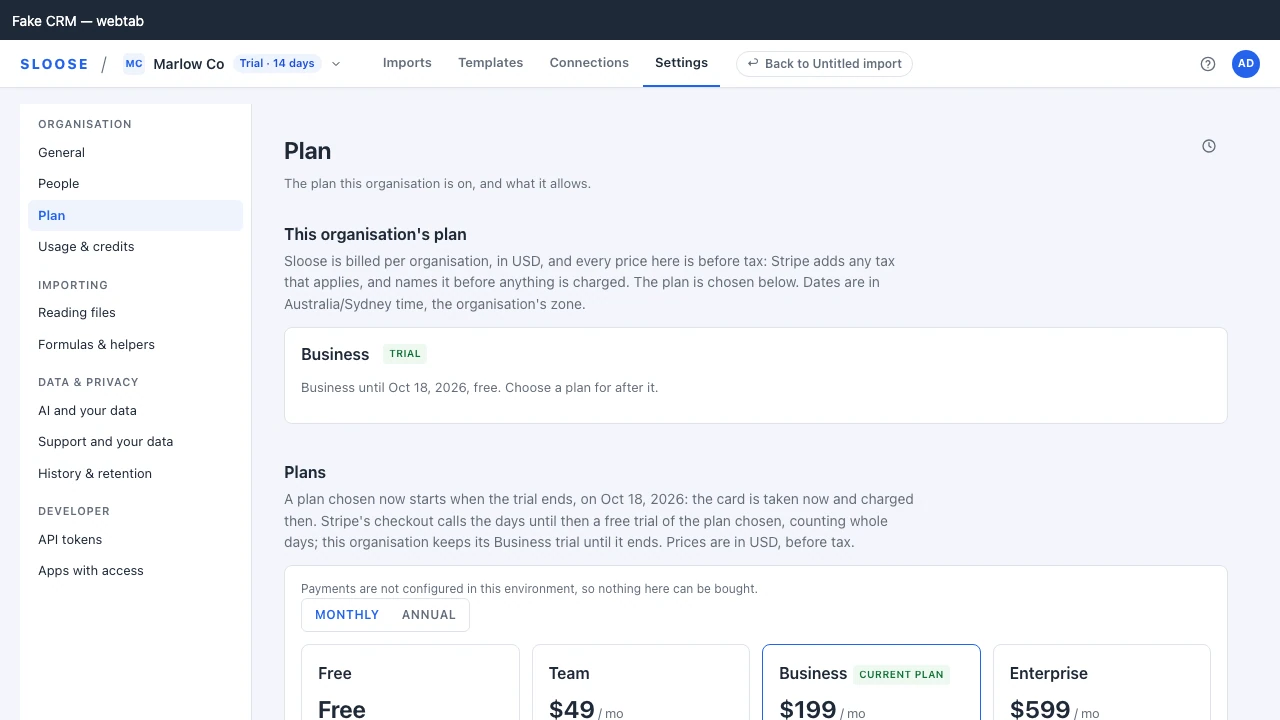
Your plan and the notices about it are under Settings → Plan; what the organisation holds against the plan, what this period has used, the credit balance and the notices about credits are under Settings → Usage & credits — each notice on the page its email links to. Dismissing one dismisses it for you, everywhere you see it, and for nobody else: one administrator’s dismissal does not hide a deadline from another. The organisation’s standing — a trial about to end, a failed payment, the organisation over its plan, a suspension — is also said in one banner under the app bar, on every page. A deadline is named with its time, in the organisation’s time zone (Settings → General; UTC when it has none), in the banner, in Plan’s notices and in the email alike — and so is every day Plan and Usage & credits name, a renewal included, which each page says once. Stripe’s billing portal counts its days in a zone of its own, so it can name the day before or after. Current prices are on sloose.com/pricing. Every price is in US dollars and before tax: Stripe adds any tax that applies where the organisation is, and names it before anything is charged.
This page explains what each limit does.
What the tiers are banded on
Section titled “What the tiers are banded on”Three things you can see and we can count: the systems you connect, how many runs you make each month, and how big one run can be.
Not how many people use Sloose. Everybody in the organisation can use it on every plan — the seat count is not what you are paying for. And not how many rows you write in a month: Sloose counts them, but an import you run in your browser is never stopped on that figure, since stopping one half way would leave your CRM half written. Rows per month is a limit for server-run imports only, when those arrive.
| Free | Team | Business | Enterprise | |
|---|---|---|---|---|
| Connections | 1 | 1 | 2 | unlimited |
| Import runs per month | 5 | 50 | 500 | unlimited |
| Imports running at once | 1 | 1 | 1 | 1 |
| Rows per run | 500 | 10,000 | 100,000 | 500,000 |
| AI credits included | 0 | 300 | 1,500 | 5,000 |
| History kept | 7 days | 90 days | 365 days | 365 days |
| CRM users up to | 3 | 10 | 50 | unlimited |
| Schedules (once scheduled imports run) | 0 | 0 | 5 | 5 |
| Rows per month (server-run imports) | 1,000 | 10,000 | 100,000 | 500,000 |
| Row overage per 1,000 (server-run) | — | $2.00 | $1.50 | $1.00 |
Features by plan
Section titled “Features by plan”| Free | Team | Business | Enterprise | |
|---|---|---|---|---|
| Shared templates | · | ✓ | ✓ | ✓ |
| Helper libraries | · | ✓ | ✓ | ✓ |
| Server-run imports (once they run) | · | · | ✓ | ✓ |
| Scheduled imports (once they run) | · | · | ✓ | ✓ |
| MCP (agents) | · | · | ✓ | ✓ |
| Rollback (not built yet) | · | · | · | ✓ |
The limits, one at a time
Section titled “The limits, one at a time”Connections
Section titled “Connections”The Zoho organisations your organisation is connected to — production, a sandbox, or each client’s CRM if
you work for several. Each is a connection of its own, chosen on Zoho’s screen when you connect,
and a sandbox counts like any other. Files you upload are not connections and never count.
Connecting past the plan’s number is refused with LIMIT_CONNECTORS.
Renewing a connection you already hold (Reconnect) never counts against the plan, even when a move down has left you holding more than it allows. Adding a new connection, or bringing a disconnected one back, does, and is refused until you are within the number. See Over the plan.
A disconnected connection does not count. It stays under Connections because its templates and history name it, and its Reconnect renews that same connection. Adding a Zoho organisation you are already connected to is refused, naming that connection; use its Reconnect instead. A sandbox of that CRM is a separate connection with an organisation id of its own, named as a sandbox (for example Example Co (sandbox); the name is the company name Zoho reports for it). When two of Zoho’s answers are for one organisation and one of them says it is a sandbox, it is added like any other with no question; a single answer is used as it is, and answers for different organisations, or none that says what it is, ask which you chose.
Import runs per month
Section titled “Import runs per month”A month is a month, however you pay. On an annual plan, the year is metered in months of it, each starting on the day of the month your plan began (or a short month’s last day): the runs and the AI credits a plan includes come afresh each month, as they do on a monthly plan. Settings → Usage & credits shows this month, and the year so far beside it.
An import run counts once, when it sends its first row to your CRM — even if your CRM turns that
row down. How many runs you have left, and how big the set
is, are checked once, when the run is authorised. What is checked as the run goes is the rows it
actually writes — see Rows per run — and that is the only thing that can
stop one part-way. Things that never count: dry runs, a run you cancel, or whose browser tab is lost, before it sends its
first row, and a free retry of a run’s failed rows (Retry N failed rows). Any finished run
can be retried, dry runs aside, but a retry is free only when the run it retries was ended by its
own page — complete, stopped by an error or cancelled, not abandoned or stopped at a limit — with
failed rows, and has not used its free retry yet (a free retry is used at the first row it sends: one you cancel, close or lose before then gives it back, and the run can be retried free again), and only up to three free retries in a row after a
run that counted. The fourth retry in a row counts as a
new run, and the three after it are free again. Retrying a run a second time, or one with no
failures, counts as a new run; so does retrying a run that never counted (it sent no row and
was not a free retry itself), which is counted in its place. When the period’s runs are used up,
a real run is refused with LIMIT_RUNS, a retry that counts included; dry runs keep working, and
Settings → Usage & credits shows how many of them have been used.
A run counts the same whichever connection it writes through: an import into a Zoho sandbox is one of the plan’s runs like any other, with no allowance of its own. A dry run is the rehearsal that costs nothing. Enterprise runs are unlimited under fair use.
Imports running at once
Section titled “Imports running at once”One import runs at a time in an organisation, on every plan. While one of your organisation’s imports is running,
starting another is refused with LIMIT_RUNS_CONCURRENT, and the Run step says so: run it once
the other has finished. Nothing is counted for the refused attempt. Dry runs are not counted
toward this limit and are never refused by it — though a dry run holds its own import while it
runs, so that import cannot start another run meanwhile. An import whose page was closed mid-run
stops counting as soon as its hold on the import lapses, about two minutes later, without anybody
having to tidy up. Two imports started at the same moment do not refuse each other: the one that
asked first runs.
Rows per run
Section titled “Rows per run”The most rows one run may write, counted across every file in the run, not any one of them — two
6,000-row files in one run of a 10,000-row plan exceed it even though neither file alone would.
Checked before anything is written, on the rows you ask the run to walk, and refused with LIMIT_ROWS_PER_RUN: a row that ends up skipped, or left alone by Leave records that already hold these values alone, still counts toward it before the run starts, though it is not counted as a row imported. Narrow the row range on
Run, run smaller subsets separately (splitting into more files in the SAME run does not help), or
move to a plan with a larger set.
A subform’s rows count as rows. Each row of a sheet imported into a subform counts as one row of the run, a parent’s rows are written together, and a parent with more rows than the run may write is refused before anything is written (Rows inside a record).
A note counts no row of its own. A note is added to a record the row has already counted, so a row with a note is still one row of the run.
And held as the run goes, row by row. Every record an import writes goes through Sloose, which admits the row before anything reaches your CRM. A run stops at the lower of two numbers: the rows it said it would write when it started, and the plan’s limit as it stands at that moment. So a plan changed under a running import is applied to the rest of it, and a run is never stopped below what it has already written. The row that would cross the line is refused before any of its records is written, so a run never writes past its limit. What it wrote before the stop stays written and counted, and the run report lists exactly which rows those are. A limit met this way is the same limit as above, and a larger plan raises it.
A run stopped at the number it declared for ITSELF is something else. It should not happen, and the message says to tell us rather than to upgrade.
CRM users — a warning, never a block
Section titled “CRM users — a warning, never a block”Measured from the last discovery: how many active users your CRM has.
If that exceeds your plan’s band the entitlements carry a warning (LIMIT_CRM_USERS). Nothing stops
working, and nothing reminds you at renewal: the warning is the two numbers side by side. Settings → Usage & credits shows the largest connected CRM’s active users beside the
number your plan is sized for, as a count rather than a meter, since it is never a limit. A fifty-seat CRM where two people import is still a fifty-seat CRM, and we would rather
tell you than break your import over it.
Schedules
Section titled “Schedules”How many schedules an organisation will hold once scheduled imports run: zero on
Free and Team. Schedules are stored today, but nothing executes them and nothing counts them
against the plan yet. LIMIT_SCHEDULES and FEATURE_SCHEDULED_IMPORTS arrive with the runner,
and no request is refused with either today.
History
Section titled “History”How long run history is kept before it is retired automatically (for 30 days after any change of plan nothing is retired, so a move down never takes history you already had). History records what happened — record by record, with the values each was matched and linked by — never the rows you imported (what it holds).
Row overage
Section titled “Row overage”Server-run imports only, and only on plans that price it. A browser import is never refused on rows per month and never billed overage — its rows are counted under Settings → Usage & credits for your own information. When server-run imports arrive, overage will be off by default: a run that would exceed the monthly allowance is refused, or, switched on, written and billed per thousand beyond the allowance.
Overage is billed monthly, so it is for monthly plans only. On an annual plan the monthly allowance is where an import stops; if you regularly need more, move to a larger plan.
The trial
Section titled “The trial”The first organisation you make starts a Business trial when it is created — signing in makes nobody an organisation, so the trial begins with the organisation, once. The trial is a courtesy rather than a condition of the organisation: if it could not be started, the organisation exists anyway, on Free, your trial is not spent by it, and support can grant one.
One trial per person. A trial is still the organisation’s: it runs there, for everyone in it, once. But each person has one to start. After you have had yours, any organisation you make starts on Free, and the page says so before you press. This counts every organisation you made, or started a trial in, whether it is open, closed or has since been erased. On Plan, Start the 14-day Business trial is the owner’s own one trial too: an owner who has had theirs in another organisation is told so there, with no button, and another owner who has not had one can start it. Support can start a trial for an organisation at any time, and that spends nobody’s.
While it runs, the organisation menu says how long is left (“Trial · 9 days”). Three days before it ends, the owner and administrators get an email, a notice on Plan and a banner — sent in the organisation’s daytime, between 09:00 and 17:00 in its time zone. Dismissed, the banner is quiet for a day for whoever dismissed it and then back, until the trial ends. A plan chosen during it with time to spare waits for that end too, so the warning stays, and says the plan that follows.
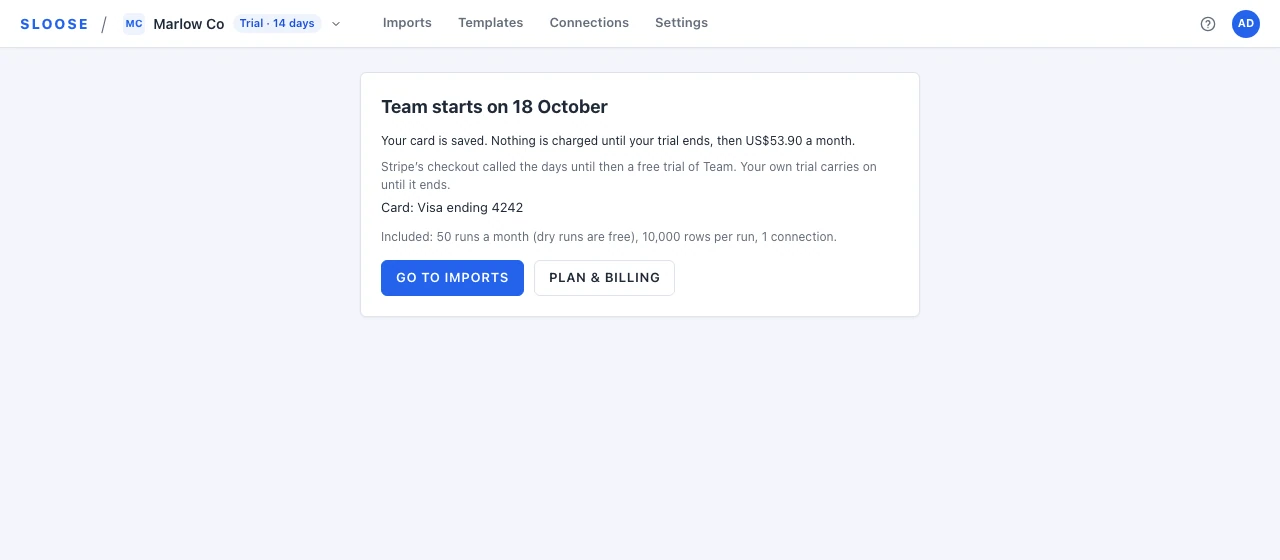
Choosing a plan during the trial. With at least 49 hours of it left, a plan chosen on Plan starts when the trial ends: Checkout takes the card now, and nothing is charged until then. Plan says both — “Business until 9 October, then Team at $49 a month” (a price before tax, like every price on Plan) — and until that day the plan after the trial can be changed, or Free chosen to cancel it before its first charge. Start Team now instead ends the trial at once and charges the plan’s first period then. With less than 49 hours left, a plan chosen starts at once, and the cards say so; one drawn before that cutoff is refused rather than charged, and Plan is read again. Stripe’s Checkout calls the days until then a free trial of the plan chosen (“Try Sloose Team, 13 days free”, counting whole days) in words of its own that cannot be changed: the organisation keeps its own trial’s plan until the day, and the chosen plan starts then.
When it ends, the organisation falls back to Free — nothing is deleted, but limits tighten and features above Free stop being available. The owner and administrators are emailed once, and a banner says what Free allows for seven days; Plan goes on saying it for as long as it is true. Neither is dismissed. A trial is once per organisation, so Plan does not offer another.
Over the plan
Section titled “Over the plan”A move down, or a trial’s end, can leave the organisation holding more than its plan allows: two connections on a plan that allows one, or more runs this period than the new plan gives. That is allowed, and only what would grow it is refused:
- Connections past the plan: this changes nothing about your imports, and Reconnect still renews a connection you hold. Adding a connection waits until the organisation is within the plan; disconnecting one is allowed.
- Runs past the period’s allowance: the next run waits until the period rolls over. A dry run is free and still works.
Everybody in the organisation sees a banner saying the organisation is over its plan. Administrators are told what is over and by how much, with See what is over, which opens Settings → Usage & credits, where each is said beside its meter. CRM users are never over: theirs is a warning (above).
Past due and suspended
Section titled “Past due and suspended”When a payment fails, the subscription goes past due and a grace period starts. Everything keeps working, and the owner and administrators get a notice they cannot miss: an email, and a banner on every page saying by when to settle it — Pay the invoice, which opens the owed invoice’s own page at Stripe, with Update card beside it, or Update card alone when there is no invoice to name.
Two days before the grace period ends they get a reminder, an email and a notice on Plan, saying that imports pause when it does. The banner keeps naming the deadline until then.
If the grace period ends without payment, the organisation is suspended, and everybody in it sees a banner saying so — administrators with Pay the invoice (or Settle the account, which opens Stripe’s billing portal), everybody else with who settles it:
- Reads keep working. You can sign in, look at your configuration, read your history.
- Runs and AI do not. A real run is refused with
STATUS_SUSPENDED, and an AI request with402 SUSPENDED. A dry run still works: it writes nothing. Templates, imports and configuration can still be edited.
Nothing is deleted for 90 days after a suspension, whatever the plan’s history window. Settling the account in that time restores it; after it, history and imports are retired on the plan’s usual window.
A suspended organisation billed by card can instead move to Free, from the Move to Free button on Plan (an administrator’s, in their own session). The subscription is cancelled at once and nothing more is charged; the organisation is Free as soon as Stripe confirms, usually within a minute, its imports are no longer paused, and Free’s allowance applies. What is owed stays owed: Sloose does not cancel or forgive the invoice that failed. It stays open at Stripe and can still be paid from its own page, and paying it does not bring the paid plan back. The paid plan’s included credits end with it; credits bought separately are kept. While that invoice is owed, the organisation cannot start a trial; buying a plan stays open to it. Paying the invoice, or Sloose voiding it, lifts that. The data kept after a suspension keeps its date: history is held until the 90 days run out, longer than Free’s seven days, and nothing is retired early. If Stripe’s confirmation is slow, pressing again says the move is under way and does nothing twice. A plan billed by invoice is changed by Sloose’s team.
What a refusal looks like
Section titled “What a refusal looks like”Every limit and status refusal carries a code from a closed set, so a client can act on it rather than parsing a sentence:
LIMIT_RUNS, LIMIT_RUNS_CONCURRENT, LIMIT_ROWS_PER_RUN, LIMIT_CONNECTORS, LIMIT_ROWS (server-run imports),
LIMIT_SCHEDULES (once scheduled imports run), LIMIT_CRM_USERS, FEATURE_*,
CREDITS_EXHAUSTED, STATUS_SUSPENDED, STATUS_PAST_DUE.
Each is listed with what to do about it in Error codes.
Changing plan
Section titled “Changing plan”Settings → Plan lists every plan, with what each includes.
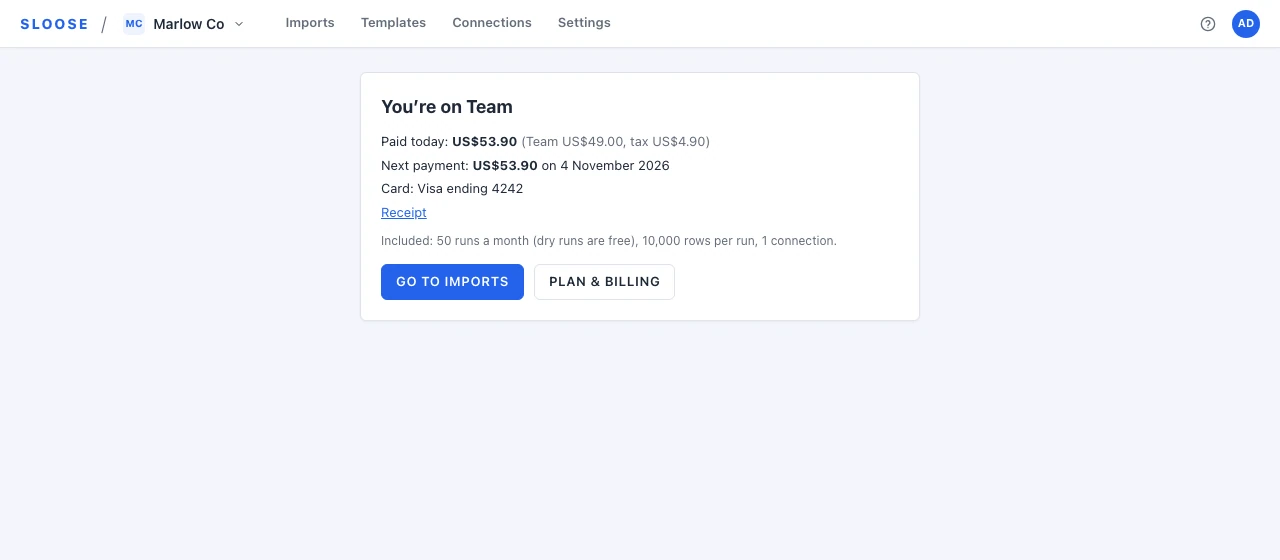
Your FIRST subscription is bought here. Choosing a plan takes this tab to Stripe Checkout, to pay by card (inside a CRM tab, which Stripe cannot be shown in, it opens a window of its own instead); Stripe sends you back to a Sloose page that says what was bought, what you paid, what is next and where to go on. Cancel it and you come back to Plan, which says nothing was charged. Every plan is bought this way, Enterprise included.
A plan chosen during your trial takes the card now and charges nothing until the trial ends, and the page says so, with the day it starts:
If Stripe has taken the payment before Sloose has recorded it, the page keeps what was paid, says Sloose is still catching up with Stripe, and updates by itself.
Paying by invoice is on request. If your organisation needs to pay by invoice, an owner or an administrator asks on Plan — Paying by invoice → Ask to pay by invoice — with the entity the invoices are made out to, its country, and its tax ID and PO number if it has them, and our billing team sets it up with you. Each invoice is emailed with our bank details, to pay by transfer within the days agreed. It names the seller, Dinode Pty Ltd, with our ABN, and carries your PO number if you gave one. Australian organisations are charged GST on top; organisations elsewhere are not. The plan’s AI credits come with each invoice as it is issued, not when it is paid.
Changing plan is done on Plan. Checkout creates a subscription and never replaces one, so an organisation that already has one changes it from the plan cards, each of which names what it does and when: Upgrade now, Move down on the renewal date, Move to Free on it, or the plan you are on billed on the other interval. Before anything is changed, a confirmation shows Stripe’s own figures: what is charged now and what the renewal will be, each with the tax Stripe priced in it named — “$218.90 a month ($199 plus $19.90 tax)”, where the plan card said $199 — anything the organisation would hold beyond the new plan, and when a shorter history would start.
An upgrade is made and charged straight away, prorated, and its limits apply at once. A move down, or to Free, lands at the renewal: until then the plan card says what is coming, and Stay on takes it back. A move down that leaves the organisation holding more than the new plan allows is still made: what is there keeps working, and only adding more is refused until it is within the plan. An organisation billed by invoice has its plan changed by our billing team.
One more thing the page is honest about rather than hiding: a plan is only offered when it can actually be sold here. Monthly and annual are listed separately, and each appears only once its Stripe price exists on this deployment — with the reason on the screen beside it when it cannot.
Manage billing opens the Stripe customer portal, which is where a card is changed, an invoice downloaded, or a subscription cancelled. While a payment is past due the button reads Update card (Pay the invoice for an organisation billed by invoice), and once the organisation is suspended Settle the account; it opens the same portal. It does not change the plan: that is Plan’s, and only while the subscription is paid by card, active and settled. Past due, suspended or invoiced, Plan says the plan cannot be changed, and does not say it is changed below.