
Curating modules
Discovery finds everything. Curation decides what your organisation actually uses, and what it calls things.
This is the difference between a tool that offers a hundred modules nobody imports into and one that offers the four you use, named the way your team names them.
Curation is each connection’s own, because the modules and fields are that CRM’s. It lives on the
connection’s pages, under Connections in the app bar — its Overview, and a page for each module
it imports into — and, for the parts that deserve review and version control, in a
configuration repository pushed with the sloose CLI. Both write the
same thing. An organisation holding two CRMs curates each on its own pages, and a change to one
leaves the other alone. Every member can read those pages; only an administrator changes them.
Choosing modules, and the order
Section titled “Choosing modules, and the order”Choosing a module makes it available to import into. Once any module of a connection is chosen, anything not chosen is invisible to everybody using the wizard. Until then, an import’s Target offers every module of the connection that Zoho lets Sloose write, sorted by name, so a CRM can be imported into the moment it is connected — curating is how an organisation narrows that down. An administrator also gets Add a module on Target, which opens the connection’s Choose modules and brings them back to the import with the module they added chosen.
Order matters, and not cosmetically: it is the order records are created in within a row,
unless a link between the row’s records needs another. A formula over the row’s own records
(rec.Account.id) puts the module it reads first. So does a lookup found by search for a record
the same file writes, where the file fills the field the lookup searches by — a Contact that finds
its Account by Account Name, in a file that maps Account Name on Accounts — because the search can
only find the record once it exists. Accounts before contacts, contacts before deals — and where
an import’s links say so, that is the order it takes whatever is set here. A search on a field the
file does not fill moves nothing: no record the file writes could be found by it, so the order set
here stands.
Choose modules — on the connection’s Overview, and as + Choose modules at the foot of its rail’s modules — opens the page where modules are switched on and off: every module the CRM has that Zoho’s API lets an import write (and any already chosen) from A to Z, each with the field a record of it matches on (or “matching is set per import” where it has no unique field), saved together. A new connection opens on that page as soon as Zoho sends it back; Choose later leaves it, and until somebody chooses, Target says the connection’s modules are not chosen yet. Modules added to the choice are written after the ones already in it. The order is set on each module’s own page (Written 2 of 4) and saves at once — the page sends the whole chosen set in order, so what you see is what the connection has.
Switching a module off loses nobody’s work. An import that was set up for it keeps that setup — its mappings, match rules, import gates and update guards — out of the way while the module is off, and says so: on Target where the module was, as a note on Validate, and on Run, which imports everything else. Switch it on again and the import has it chosen, set up as it was. An import that no longer needs it can discard what it keeps, from Target; that cannot be undone.
Your plan does not count modules. It counts connections: a connection takes one of the plan’s slots when it is added, and every module of it comes with it.
Modules gone from the CRM
Section titled “Modules gone from the CRM”When a read of the CRM no longer finds a module, nothing is imported into it any more, and it is listed on the connection’s Gone from the CRM page, with the date it went where that is known. The rail counts them, and offers the page only when there are some.
A module the CRM still has can leave the list too: when Sloose cannot write to it (Zoho made it one of its own system modules, say), a read no longer offers it. That is No longer offered, not gone: the page says so for each one (“Sloose cannot write to it”), the read’s summary counts it apart from the modules the CRM lost, and the page is titled for what it holds — Gone from the CRM, No longer offered, or Gone or no longer offered where it holds both. It is treated as a gone module otherwise: it can be removed, and it comes back if Sloose can write to it again.
An administrator can Remove… one. Sloose forgets its fields, and the module leaves the connection’s pages. An import or a template set up for it keeps that setup aside, exactly as for a module switched off, and gets it back if the connection offers the module again: a read of the CRM that finds it brings it back as it was, chosen if it was chosen. Choosing other modules while it is gone leaves its choice alone; clearing every module’s choice — which a configuration repository or the API can do, since the page asks for at least one — clears its choice too, and imports are then offered every module the connection can write. Only a module that has left the list can be removed — gone from the CRM, or no longer offered; one still offered is simply not chosen.
Where more than one has gone, Remove all on the same page (it says how many) removes every one of them at once, after one question rather than one each. A gone module’s own page says that it has gone (and since when, where that is known), offers the same Remove…, and lists the fields Sloose held for it, each marked as still returned or no longer returned by the CRM, to read but not to change.
If every module chosen for a connection has gone from the CRM or is no longer offered, an import through it is offered nothing, and Target says so: choose others on the connection’s page.
Keys and singular names
Section titled “Keys and singular names”Two names, used in different places, and both worth choosing deliberately.
The key is how the module is referred to in mappings, templates and configuration files. Lower
case, an identifier: accounts, contacts. Discovery makes one from the module’s API name, and a
configuration repository or the API changes it; the module’s page does not show it.
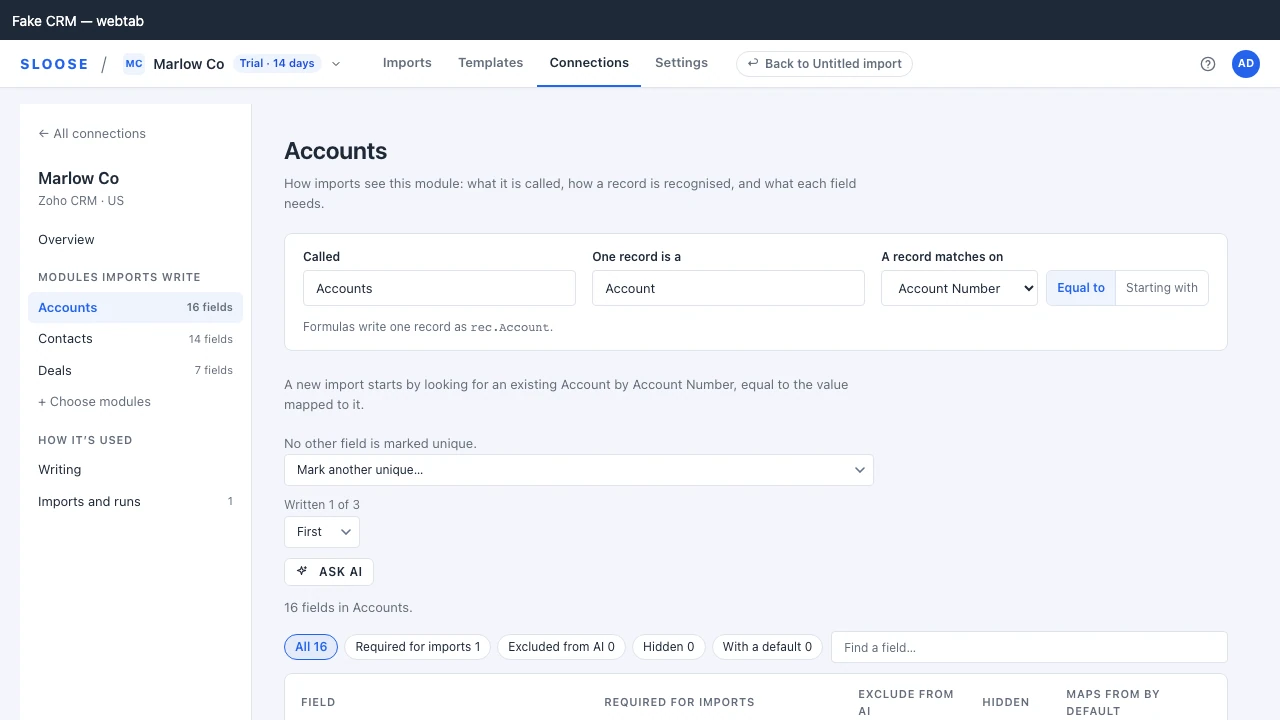
The singular — Formulas call one record, on the module’s page — is the name expressions use for a record written earlier in the row:
rec.Account.idSo Account as the singular means rec.Account. Choose the word your team would say. If you call
them Clients, set the singular to Client and every formula anybody writes reads the way they
already talk.
It is one word, an identifier, and it is yours to set. What the CRM itself calls the module and one of its records (“Sales Orders”, “Sales Order”) is shown beside it on the page as The CRM calls it, read only, as the last read of the CRM found it.
Both must be unique among the connection’s modules — a clash with a module the change leaves out
is refused with KEY_CLASH, and a registry that gives two of its own modules the same one with
INVALID_REGISTRY, rather than silently shadowing something.
The context name itself (rec) is the organisation’s: Record name in formulas, on Settings →
Formulas & helpers.
Unique fields
Section titled “Unique fields”Fields that identify exactly one record. Recording them buys three things:
- Validation warns when an import maps a unique field without a match rule, which is the setup that quietly creates duplicates.
- Validation stops a run whose mapped data repeats a value in a unique field the match rule does not cover: every row after the first of each set would be refused as a duplicate.
- Auto-mapping is more careful with them. A guess that lands on a required or a unique field is put first in the queue of guesses, and one whose column repeats a value in a unique field says so, because a wrong value in a matching key is not recoverable by re-running.
If your accounts have an account number, this is where you say so: A record matches on, on the module’s page, chooses the first unique field, and Mark another unique… below it adds the rest.
Default match rules
Section titled “Default match rules”A module can carry a default match rule — field, method and expression — which every new import starts from. On the module’s page the field is A record matches on and the method is Equal to or Starting with, and the page says the rule a new import starts with in a sentence. A rule written as an expression is changed in a configuration repository; the page says so rather than offering it.
This is how you stop each person inventing their own answer to “what counts as the same account”. They can still change it for a particular file, but the default is the organisation’s considered answer rather than whatever the last person happened to pick.
What is inside a module
Section titled “What is inside a module”Open a module — from the connection’s rail, or its row on the Overview — and below what it is called and what a record matches on, its page lists the fields discovery found in it, one row a field, with its marks as columns. They are the same annotations a configuration repository writes, so use whichever suits the change: a mark for the one field somebody just asked about, a reviewed file for a set that grows over years.
| Column | What it does |
|---|---|
| Required for imports | Whether every import has to fill it: As the CRM says, or your own answer. See Required for imports. |
| Exclude from AI | The field’s values are never sent to the AI in any form — not as they are, and not as their shape — whatever the organisation’s AI setting; its examples stand in for them, sent as written, so make them up. See Excluding a field from AI. |
| Hidden | Never offered when mapping a column, in any import through this connection. An import already open picks the change up when you go back to it. |
| Maps from by default | What the field maps from in an import that has not mapped it: nothing, a fixed value or a formula. See default mappings. |
Opening a field’s row gives the rest of it. Derived marks a field filled by a formula rather than from a column: auto-mapping skips it, and the Map step does not offer Column for it. Hide on every module hides a field of that name on every module of the connection at once. Below them are the field’s description, format, case, rule, aliases, examples and default. Filters above the list (Required for imports, Exclude from AI, Hidden, With a default) and Find a field… narrow a long module down.
A module’s fields are read when its page opens, not with the connection’s other pages — a real organisation is thirty-odd modules of several hundred fields each, and you came for one of them.
Fields your CRM will not let Sloose write — read-only, filled by the CRM itself, such as an auto-number or a formula, or kept by the CRM for itself, such as Tag and a record’s status — are listed together after the rest, closed until you open them. They take no marks: Map fields does not offer them. A field the CRM keeps for itself that you have set something on (a description, a default, a mark) stays in the main list, marked kept by your CRM, so what you set is not out of sight. That is only for a field the CRM does not also fill in or lock: a read-only field, or one the CRM fills itself, is in the closed list whatever is set on it.
Fields your CRM has stopped returning are kept and hidden. The list says how many, and Show fields the CRM no longer returns offers them: a template saved last year still names one, and “why does this mapping do nothing” is answered by seeing that the field is gone. A field like that takes no marks — there is nothing to mark on a field nothing can write to.
Excluding fields
Section titled “Excluding fields”Fields nobody should map: internal identifiers, system timestamps, things maintained by a workflow.
Excluding them is not about security — they are still in the CRM and still visible there. It is about the mapping screen being usable. A module with 180 fields where 40 matter is much easier to work with once the other 140 are out of the way.
An exclusion is a mark on the field itself, and it is the connection’s: Hidden on the field’s
row hides it on that module, and Hide on every module, in the opened field, hides a field of that
name on every module of the connection — for something that appears on everything. In a
configuration repository a module’s excludedFields, and systemExcludedFields for every module,
set the same mark. Neither list takes one off, and nor does a fields/<module>.json that says
nothing of the field. A push writes the mark only where a file says it: excluded: true on a
field in its module’s fields file hides it, excluded: false offers it again, and a field the
file leaves out, or names for something else, keeps the mark it has — whether a list set it or
somebody ticked Hidden on its row. A field is offered again by unticking Hidden, or by
excluded: false in its module’s fields file, which wins over a list in the same push.
Default mappings
Section titled “Default mappings”A mapping a field starts every import with lives on the FIELD — see
default mappings. It was a module setting called
seedMappings until the two were folded together.
Values already stored were moved for you; a repository is yours to update. Migration 0035 put
every stored seed on the field it named. A configuration repository still carrying seedMappings
is refused — by sloose push before it sends, and by the API if anything else tries — because a
server that guessed at what the file meant would write defaults nobody reviewed. Move each one into
fields/<module>.json as a defaultMapping on the field it was keyed by.
Colour and label
Section titled “Colour and label”Cosmetic, and worth the thirty seconds. A colour per module makes a multi-module import readable at a glance in the grid and in the run report; it is set from a configuration repository. The label is what people see everywhere, and is Called on the module’s page. A label you choose stays through a whole read of the CRM, and one you never changed follows the CRM’s own name — see what survives a re-run.
Fields nobody can map
Section titled “Fields nobody can map”Some fields cannot be written by an import at all: the CRM stamps them itself (Created_Time,
Modified_By), writes them through an API of its own (Tag), or holds something a column cannot
carry (Record_Image is a file). Sloose hides those for every organisation — it is a fact about the CRM,
not a decision about your data — so there is nothing to configure and nothing to switch off.
systemExcludedFields is where you add to that list: fields your organisation never imports, hidden on
every module of the connection the repository is pushed to, so nobody has to decide about them
again. It adds; it cannot take a field off the CRM’s own list, because there is no mapping there
that would work.
A worked example
Section titled “A worked example”Two modules, in creation order, each with the fields that identify a record and a default match rule, and two fields no import is offered:
{ "version": 1, "modules": [ { "key": "accounts", "apiName": "Accounts", "label": "Accounts", "singular": "Account", "defaultEnabled": true, "uniqueFields": ["Account_Name"], "defaultDuplicateCheck": { "searchField": "Account_Name", "searchMethod": "equals", "expression": "row.Company" } }, { "key": "contacts", "apiName": "Contacts", "label": "Contacts", "singular": "Contact", "defaultEnabled": true, "uniqueFields": ["Email"], "defaultDuplicateCheck": { "searchField": "Email", "searchMethod": "equals", "expression": "row.Email" } } ], "systemExcludedFields": ["Created_Time", "Modified_Time"]}Doing this in a repository
Section titled “Doing this in a repository”Everything on this page but removing a gone module can live in a configuration repository and be
pushed with the sloose CLI, so the curation is reviewed, versioned and reproducible across organisations.