
Value maps
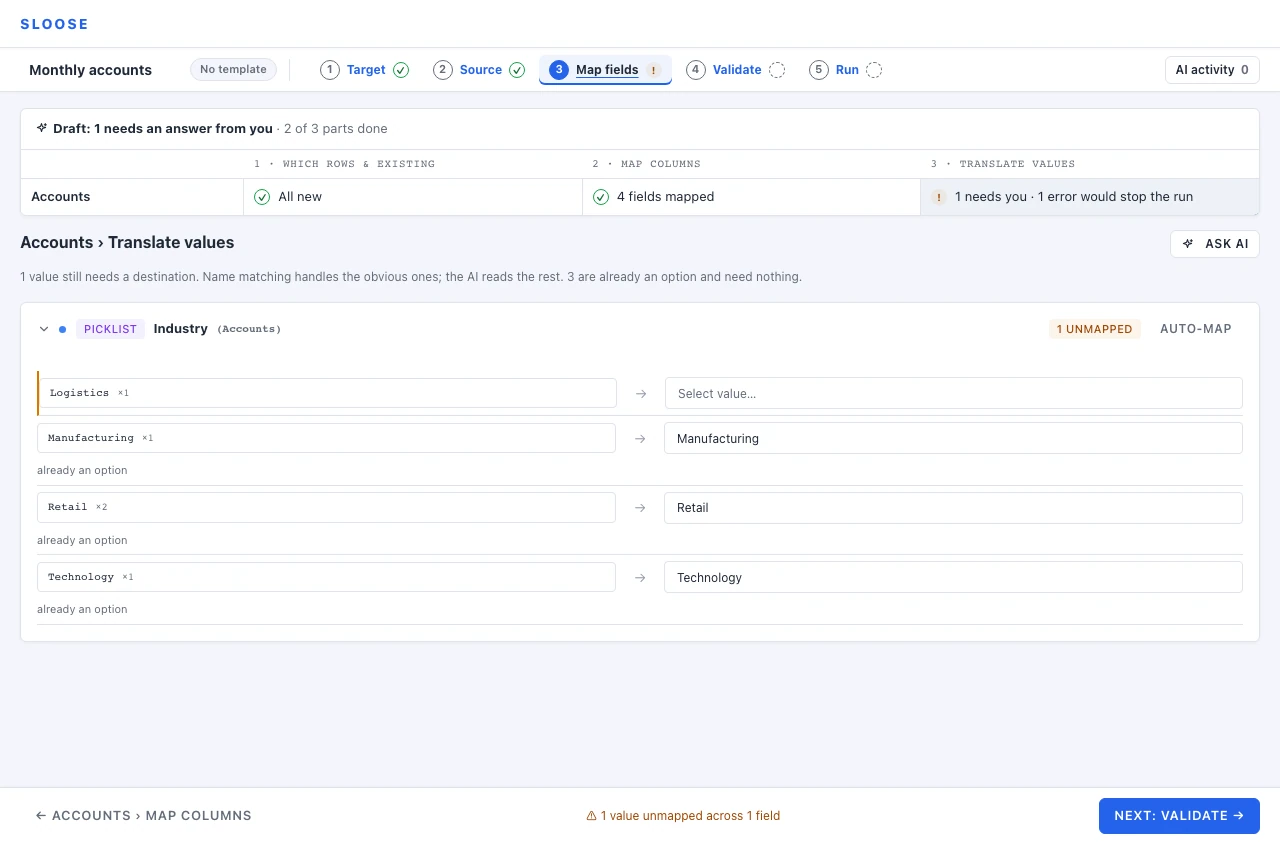
Your file says Tech. The picklist says Technology. This step is where you say they are the
same thing.
Two kinds of field need it: picklists, which accept a fixed set of options, and lookups, which point at another record.
It shows one module at a time — its head says which, Accounts › Translate values — and the map of the work above it takes you to the others, as it does on Map columns. Next goes on to the next part not done — another module’s values, or a part before them — and, while that is not Validate, Validate → beside it leaves for Validate whatever is still open.
Picklists
Section titled “Picklists”Every distinct value the rows this module takes produce for a picklist field is listed (rows its Which rows rule holds back are not counted), with how many rows carry it and what it maps to. A value already spelt as one of the options says already an option and needs nothing. Unmapped values are counted in the header so you can see at a glance which fields still need work.
Three things you can do with a value:
- Map it to one of the destination’s options.
- Leave it blank — — Leave blank — in the list of options (∅ blank beside a lookup’s record picker): an explicit choice, recorded like any other mapping.
- Leave it unmapped — which Validate stops on, because a value that is not one of the field’s options is not refused by the CRM: Zoho stores it as it was sent, and the record then holds a value its own list does not have. One case passes, measured on a real CRM: a value for a single-select field that differs from an option only in its capitals, or in spaces around it — advertisement for Advertisement, ÉTUDIANT for Étudiant — because Zoho stores the option’s own spelling, which is what Sloose sends and what a dry run shows for that row. A difference in an accent does not pass (Etudiant is stored as sent), and each part of a multi-select, once the spaces around it are trimmed, has to be an option in its spelling and its capitals, since Zoho stores every part as sent. Map fields’ count of values to translate, the formula editor’s preview and the check an AI agent runs over the API all say the same.
Leaving a value blank is a real answer
Section titled “Leaving a value blank is a real answer”If your file’s Misc has no equivalent in the CRM’s list, mapping it to blank is more honest than
inventing a category to park it in. Nothing is sent for the field on those rows, and you have
said so on purpose: a record the run creates has it empty, and one it updates keeps what it had.
It shows up on the Validate step as a warning with a row count — “will import EMPTY on 40 of 120 rows” — so a decision that affects forty rows does not pass unnoticed.
Values produced by a formula
Section titled “Values produced by a formula”A field mapped by formula still produces picklist values, and they are checked the same way. If your expression can emit something that is not a valid option, validation catches it here rather than at the row.
Lookups
Section titled “Lookups”A lookup field points at a record in another module. Your file has a name; the CRM needs an id.
Two ways to bridge that:
Map the values. Each distinct source value maps to a specific record. Right when the set is small and stable — a dozen owners, five regions. It is explicit and it does not change under you.
Use search mode instead. Map the field on Map columns with a search, and the record is found at run time by whatever value the row carries. Right when the set is large or changes often — every account in your CRM.
Validation names search mode beside every lookup value left unmapped, because hand-mapping four hundred account names is not a good use of an afternoon.
A lookup column whose values are not record ids is guessed as a search only where its header or its values say which field to search by (Map fields has the rule); any other is guessed as the column, and its values are asked about here.
Sloose reads the module a lookup points at when its card opens, and not before. One read brings up
to 200 of its records; when that is every record, each value is matched against them by the rule
Auto-map matches by, which forgives case, spacing, punctuation, accents on Latin, Greek and
Cyrillic letters, and full- or half-width forms (Sí is Si, TOKYO is Tokyo), but never a
mark that is part of a letter (バス is not パス); a value with no words at all (#, %) is never matched as near
to another, only as the very same text. When the module has more, each
of your file’s values is looked up in the whole module exactly as the import will look it up — one
record maps, two or more are left for you to choose between, and a near spelling is left to Ask
AI, which is shown what those look-ups found and, for up to 20 values they found nothing for, a few
records whose names come close. While the module is read the card says so, and when the read fails
it says why, with Read again beside it.
When none of a lookup’s values names a record of the module there is nothing here to map them to, and the card says so. Link by search beside it switches the field to search mode, looking each value up by the field the CRM names those records by as the import runs; one that still finds none is left empty, and the run says which. It is not offered for a column whose name, written in a formula, is another header’s too (Campaign Source beside Campaign-Source), since the search could read the other column; the card says so instead.
Dates, numbers and text
Section titled “Dates, numbers and text”These need no value map. They are converted by type, using your organisation’s settings:
- Dates — ambiguous numeric dates (
03/04/2024) are read using the organisation’s date format setting, which is day / month / year, month / day / year or year / month / day. A new organisation takes its order from the browser of the person who made it: a browser set to Australian or British English reads03/04/2024as 3 April, one set to American English as March 4, and one that writes the year first leaves it day first. The form that makes the organisation says which. Nothing asks, so check Date order under Settings → Reading files before the first import, and change it if your files are written the other way round. A date that is a day only in the other order —03/25/2024read day first — is not quietly read the other way: Validate stops on the column, with the rows, and says to set the order or to map the column through a formula that names it, written out with the column’s own name:helpers.date(row["Closed"], 'MM/DD/YYYY'). So does a column that mixes the two orders. Sent as it is, such a value is refused by the CRM. Unambiguous formats like2024-03-17are read as written. - Numbers — parsed leniently, each by the decimal mark it shows (
1.234,56and1,234.56are the same number), and one that shows none (1.234) by its column’s, else your organisation’s.helpers.num()is available in expressions when you need to be explicit. - Text — passed through. Over-long values are caught at validation against the field’s length.
If a specific column needs different handling, that is a formula on Map columns, not a value map.
Auto-mapping values
Section titled “Auto-mapping values”Each field’s Auto-map offers what it can match by name, free and without the AI — exact matches, near-matches that differ only in case, spacing, punctuation, accents and character width (not on a mark that is part of a letter, and a value with no words is matched only to an option written the very same way, never as near to another; for a lookup, by the rule above), and for a picklist the words files use for “nothing here” (N/A, NA, TBA, None, -, — and 0, where no option is a near match) as blank. What it finds lands as guesses on the values, with the field’s bar to use them, and nothing is used until you say so. A value that could be several options, or several records, is left to you, on the same principle as Guess without the AI on Map columns: an obvious gap beats a plausible mistake.
Asking the AI
Section titled “Asking the AI”Where AI is configured, Ask AI at the top right of the step is one conversation about the
module’s values. Its Match the N values to options asks about every value still without a
destination. Anything you type goes with the question as context — our vendors are
distributors. Not quite… on a value’s guess is the same conversation, narrower: Why this?,
Is there a better option?, or what it should be. It is the step the free pass genuinely cannot
do — Tech → Technology is within reach of string distance, Aus → Australia is not.
The conversation is kept with the import, so it is there when the import is opened again — by you, or by anyone else in your organisation who can open it — and each question says who asked it. It is the module’s, whichever of the import’s files its values came from, and stays with the import when a file is removed. A question asked while a change of yours is still being saved is not kept: its answer stays on the page. See Your data and the model for what is kept, and for how long.
What comes back lands on the values as guesses, and nothing is written until you use one. It is split in two, deliberately:
- Sure — the model was confident and clearly ahead of its second choice. The field’s bar takes these in one click: Use the N confident guesses, or Use all N when every one is sure.
- Offered — everything else, as candidates, best first.
Every option it names is checked against the field’s real options before you see it, so it only proposes an option the field actually has. See What the AI does.
It has to read your values to say what they mean, so it is offered when your organisation’s AI data
setting shares them (Allowed), and under Masked for a picklist or multi-select field filled
straight from a column: that column’s distinct values are sent, without their counts — nothing
else of the file, and never a column named like a field excluded from AI — and the step says so
once, naming the setting.
Under Masked a lookup is not asked about, since its values are the names of records, and nor is
a field a formula fills, since a formula can read any column: each says so on the field, and its
values are matched here. It never reads a field excluded from AI: that field says so
instead of offering to ask. Nor a field filled straight from a
column named like a field excluded from AI — asked about one, the AI leaves it out and says why.
Under Never the step says its values are matched here, without the AI, and names the setting —
with a way to change it for an administrator. Auto-map works the same, and for a picklist it also
offers the closest options to each value it could not place, for you to choose from. Where two
options are equally near (Tas starts both Tasman and Tasmania) none is emphasised, unless the
column’s other values (NSW, Qld) or the org’s time zone say which country the values are from:
then the option in that country comes first, and says why. See
Your data and the model.
Saving the work
Section titled “Saving the work”Value maps are part of the template. Save the template and the mappings come back next time with the
next month’s file, so Tech → Technology is a decision you make once rather than every month.