
Field annotations
Your CRM knows a field is called Account_Number and holds text. It does not know that your
files call it Cust No, that it is always six digits, or that Mobile should be excluded from AI.
Annotations are where you write that down. They are the difference between auto-mapping that guesses and auto-mapping that knows.
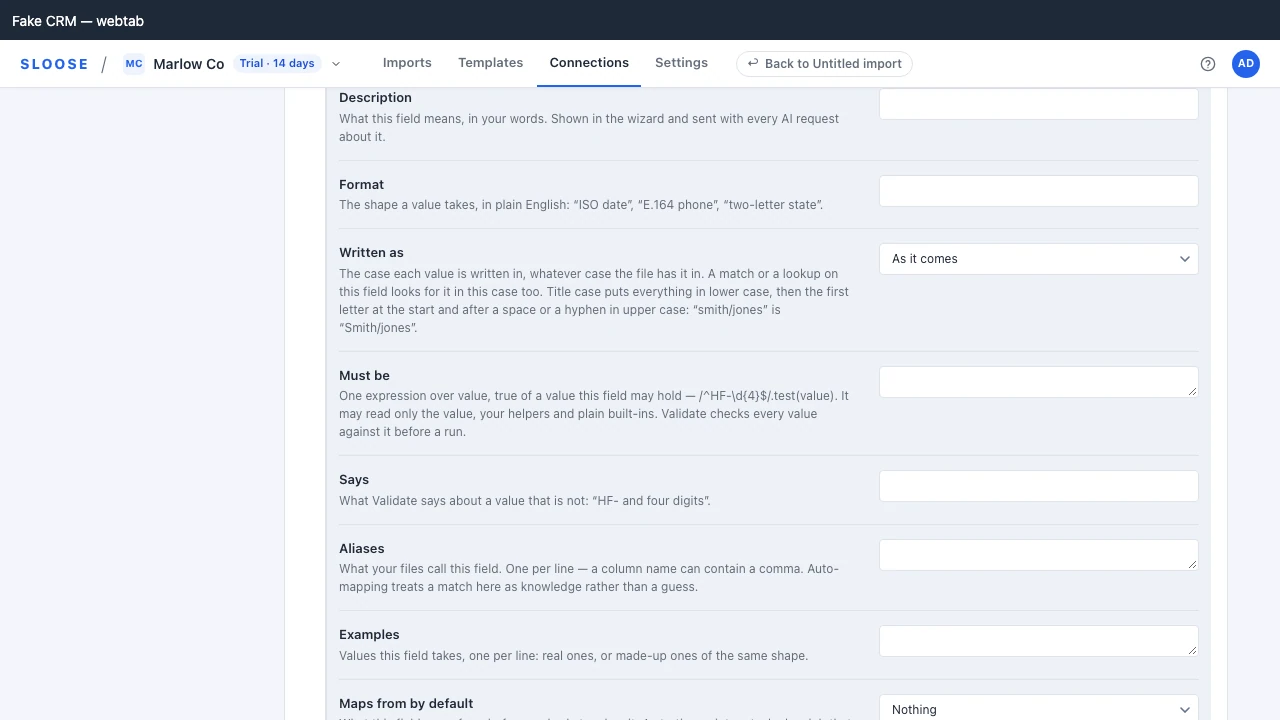
What an annotation holds
Section titled “What an annotation holds”| Field | What it does |
|---|---|
description |
What this field means, in your own words. Shown in the wizard; sent to the AI. |
format |
The expected shape in plain English — “ISO date”, “E.164 phone”, “two-letter state”. |
writtenAs |
The case every value is written in: "upper", "lower" or "title". Text takes all three, an email lower case only, every other kind none. See below. |
mustBe |
What every value has to be: a rule over value, and what Validate says about a value that isn’t. See below. |
examples |
Example values: real ones, or made-up ones of the same shape (what Fill in with AI proposes). Sent to the AI as written — and when the field is also excludeFromAi they stand in for its values, so make them up. |
aliases |
Column names your source files use for this field. |
excludeFromAi |
Exclude from AI. The field’s values are never sent to the AI in any form — not as they are, and not as their shape — whatever your organisation’s AI setting, and Translate values does not ask the AI about it. Its examples stand in for its values, sent as written. What is computed for you comes back unmasked, with one exception. |
derived |
Never mapped from a column — computed, or left alone. |
defaultMapping |
What this field maps from, in every import that has not mapped it. See below. |
excluded |
Hidden from mapping on this connection. |
requiredForImports |
Whether every import has to fill it: true, "waivable" or false where you say otherwise than the CRM, absent for what the CRM says. See below. |
Aliases are the highest-value entry
Section titled “Aliases are the highest-value entry”An alias says: our files call this field that.
It changes auto-mapping from a guess to a fact. A guess from an alias says how it was found on Map fields — by name: the column is called “Cust No”, a name your organisation has taught, and known name · sure once used — and it is a sure guess, taken with the others in one press, where a column whose name is only spelt like the field’s is a guess for a person to check, or is not found at all.
An alias and a unique field are the two halves of one sentence on Map Fields. The unique field says which field identifies a record — what the module’s default rule is built on, and what the card at the top of the module pins first in the list with a KEY badge once it is chosen; the alias says what your files call the column that carries it. With both recorded, the free matcher finds the key’s column in a file it has never seen, with no model call. It still waits for one press of its own: the KEY row is never taken with the other guesses in bulk, whatever found it and however sure it is, because a wrong value in the field the whole import matches on updates the wrong records.
Add aliases as you meet them. The first time somebody’s export calls the account number Cust No, that is a thirty-second annotation that saves the same manual mapping every month afterwards, for everybody.
Excluding a field from AI
Section titled “Excluding a field from AI”Tick Exclude from AI on the field’s row, on its module’s page under Connections, or
write excludeFromAi: true from a configuration repository. Either way it is the same annotation.
The field’s values are then never sent to the AI in any form — not as they are, and not as their shape (letters as x, digits as 9) — whatever your organisation’s AI setting. Under every sample policy the field’s data is withheld before it reaches a model: a column named like the field has its cells left out of the sample rows and of what the file assistant reads, and the model is told the column is withheld. A validation problem’s values about the field are left out too, and so are its words when they may quote one. The values you paste for the field in Fill in with AI are not shown to the AI at all, and Translate values does not ask the AI about the field.
Its examples stand in for its values, and they are sent to the AI as written, under every
policy: with the rest of what you wrote about the field, they are all the model knows of what it
holds. So for a field excluded from AI, make them up — values of the same shape as the real ones,
none of them real. The field’s Examples box says so once the field is excluded: Sent to the
AI as written, in place of this field’s values: use made-up values like these.
Worth understanding precisely, because it is a guarantee with a boundary:
At auto-map time, no column has been mapped to any field yet — so the link between a column and a field excluded from AI is made by name. A column that fuzzy-matches the field’s API name, its label or one of its aliases is treated as that field’s data and withheld.
That is a good-faith match, not a proof. If you need more than a heuristic, set the
organisation’s sample policy to masked, which masks every value regardless — except the distinct
values of a column you map to a picklist or a multi-select, which are sent so they can be matched to
its options — or to deny, which sends none. See Your data and the model.
Excluding a field from AI is still worth doing under masked. It keeps the field’s values from
going even as their shape, and keeps the field out of the one thing that policy sends as it is — a
picklist’s or a multi-select’s own column, for Translate values. Under deny no value goes anyway,
and the flag holds whatever the setting is changed to later.
Default mappings
Section titled “Default mappings”The fields that are always the same — a lead source, a country, a fixed Imported by Sloose in a
field of your own, a link to the account created earlier in the row — do not need mapping by hand
every time. A record’s owner and its tags are not among them: no import can write either, so no
default can (see fields nobody can map).
{ "apiName": "Account_Name", "defaultMapping": { "mode": "expression", "transform": "rec.Account.id" }}A default is a starting point, not a lock. It fills the field in wherever an import has no mapping for it at all — on a new import, and on an import already open the next time its module’s fields are read — and anybody can change it for their own. An import that already has a mapping keeps it — including one somebody deliberately cleared.
Two modes make sense as a default for every import, and those two are what a module’s page
offers.
static is a fixed value; expression is computed from the row or from a record written earlier
in it. A COLUMN makes little sense as one — a default applies to every import, and a column name
belongs to one file — so the settings page will not write one.
It will not quietly delete one either. A FieldMapping is a FieldMapping, so a configuration
repository can push a column, a search or a skip as a default and the import honours it. The
field’s row then says Set elsewhere under Maps from by default, and the opened field says the
page cannot show that default and that saving the field’s details there replaces it; ticking a mark
on its row keeps it. Change one where it was written.
This was seedMappings on the module — the same mapping, indexed by field api name, one level up
from the annotations. One field now has one place to say things about it.
Descriptions and formats
Section titled “Descriptions and formats”These reach two audiences.
People, in the wizard, where a field called CF_Ref_2 with a description is usable and one
without is a guessing game.
The model, in every AI prompt. A field with a description and a format gets better proposals than one identified only by its API name — which is the cheapest possible improvement to auto-mapping quality.
Fill in with AI
Section titled “Fill in with AI”Ask AI on a module’s page proposes what to write about its fields: a description, a format, examples, the case its values are written in (Written as), a rule they must pass (Must be), and whether to exclude a field from AI when its values look personal (Exclude from AI). Open a field and its own Ask AI proposes them for that field alone. Only an administrator can ask, since only an administrator can save what comes back.
The ask covers:
- either the fields with something not filled in, or all of them;
- never the hidden fields, the ones your CRM fills in itself, or one you are typing in. A hidden field’s own Ask AI still covers that field, because you opened it on purpose;
- at most 50 at a time. With more, it asks about the first 50 by name and says how many are left.
You choose which of the six it proposes. Exclude from AI is a judgement about every field rather than something left blank, so it does not decide which fields have something not filled in.
What the model is shown is each field as your CRM describes it, and a sample of its records. That means its label, type, length, options and whether it is required, plus what your organisation has already written about it. To show what each field holds, Sloose also reads up to 20 of the module’s records from your CRM, the most recently changed, for each ask and again for What the model is shown, and keeps none of them: Sloose stores none, and the AI gateway is told to keep a record of the ask (its organisation, model, size and cost) but nothing it carried (what is sent). Each value goes up to its first 200 characters. Each field’s values among them follow your organisation’s AI data setting: as they are, as shapes, or — under Never — not read at all. A field excluded from AI is never read. If your CRM can’t be read just then, the ask goes on with the fields alone, and says so.
A field’s own ask can also take values you paste, up to 20, each up to 200 characters. The box says how many it will leave out. They follow your organisation’s AI data setting: as they are, as shapes, or not at all — and for a field excluded from AI not at all, whatever the setting: its examples stand in for them.
What the model is shown, on the ask, opens exactly what would be sent before you spend anything, the records’ values included. It reads them afresh, so a record changed in between shows as it is when you ask.
The answer is a table, one row a field:
- Each proposal has Use this and No thanks. A row has Use all, and the table has Use all, Review one by one and Discard.
- What you have already written is shown above the proposal as Yours. It is replaced only if you use the proposal.
- An example is offered only when its field would take it: a value of its type, within its length, and for a picklist one of its options. It is made up: one that is a value read from your records for any field, or holds one, is left out without being quoted back — the same address in another case, a phone number written another way, a date in another order, a number with a currency sign, or an address that keeps a real person’s name before the @. A picklist’s examples are its options, whoever holds them.
- Exclude from AI is proposed for a field whose values look personal — they name, identify or reach a person: a name, an email address, a mobile number, a home address, a date of birth, a tax or bank number — with why, as This looks personal: … Exclude it from the AI? It is never proposed for a field already excluded.
- A case is offered only where the field’s type takes one: any of the three for text and a long text, lower case only for an email.
- A rule is offered only when it could be saved — it reads only the value, your helpers and plain built-ins — and never for a lookup. It also has to hold for every example it is tried on: the ones proposed with it and the ones the field already has, each in the field’s case. The rules are run with your helper libraries as they are now. If a rule fails, the AI is told what happened, once, and asked about that field again. A rule that still fails is left out, and the rest of that field’s proposal is offered. A rule with no example to try it on is not offered.
- What was left out is listed under the table, with the reason.
Nothing is saved until you save the page. The proposals you used are written in one go, and the change log says each was the AI’s proposal, used by you.
An example was checked against the fields as they were when you asked. If something else changes them before you save, such as a discovery or another administrator’s save, the proposals are put away and the page says so. Ask again for new ones. Your own saves on the page don’t do this.
An ask is priced by how many fields it covers (see AI credits), and one that proposes nothing is free.
Written as
Section titled “Written as”writtenAs is the case a field’s values are written in, whatever case the file has them in. Set
it under Written as when you open a field, or push it from a configuration repository.
"upper"writeshf-0231asHF-0231."lower"writesAda@Example.comasada@example.com."title"writesMARY-JANE smithasMary-Jane Smith. Everything goes to lower case, then the first letter at the start and after a space or a hyphen goes to upper case. A letter after an apostrophe stays lower case, soo'neilbecomesO'neil.
Which fields take which case:
- Text and long text take all three.
- An email takes lower case only. Nobody types an address in upper or title case.
- A website takes none, because changing the case of a link’s path can break it.
- No other kind takes one. A picklist has to match its options as they are spelled, and a number, a date, a phone or a lookup has no case to change.
A case a field doesn’t take is refused when it is written (422 WRITTEN_AS_NOT_FOR_KIND). The
refusal names the field, its kind and the cases it takes.
The case applies wherever the value is used: the value written, the value a match on the
field looks for, and the value a lookup searches for. So a record written in upper case is found
by the value that made it. A length is checked after the case, because a few letters change
length: ß in upper case is SS.
Validate notes the values that will change, with examples of what they become. It’s a note, not an error, because your setup asked for the change. Map fields marks the field with its case.
If your CRM later changes the field’s type to one that takes no case, the setting does nothing, and the next save of that field on its page drops it.
Must be
Section titled “Must be”mustBe says what a field’s values have to be: a rule, and the words Validate shows beside a
value that doesn’t pass. Set it under Must be and Says when you open a field, or push it
from a configuration repository:
{ "apiName": "Ticket_Ref", "mustBe": { "rule": "/^HF-\\d{4}$/.test(value)", "says": "HF- and four digits" } }The rule is one expression over value. A value passes when the rule is true of it. The
rule may read:
value, the value as it will be sent: trimmed, and in the field’s case when it has one;helpers, your organisation’s helper functions;- plain built-ins:
Number,String,Boolean,Math,RegExp,Date,JSON,parseInt,parseFloat,isNaNandisFinite.
Regular expressions are welcome; most rules are one. A small function is fine too, such as
value.split(";").every((part) => part.trim() !== "").
A rule may not reach anything else. It runs in the browser of everyone who validates an
import, so it can’t read the row, other records, the page or the network. It also can’t get at
a value’s machinery, such as value.constructor. A rule that tries is refused when it is written
(422 INVALID_RULE, naming the field, the rule and why), and the field’s page says why before
you save.
Validate checks every value before a run. A value the rule isn’t true of is an error, said with
your words and the rows it is on. An empty value isn’t checked: whether a field may be empty is
what Required for imports says. A rule that fails on a value, such as
JSON.parse on text that isn’t JSON, counts as not passing. The run itself doesn’t check the
rule, so fix what Validate shows before you import.
A value worked out during the run can’t be checked before it. A formula that reads another
record (rec.…) and a record a search finds have no value until the run, so Validate refuses the
run for a field with a rule mapped either way. Map it from the file or from a formula over the
row, or remove the rule.
Derived and excluded
Section titled “Derived and excluded”derived: true — the field gets its value from an expression or a workflow, never from a source
column. It stays visible, auto-mapping leaves it alone, and the Map step does not offer Column
for it. A mapping made before the mark still imports; Validate says which field and which column,
because taking somebody’s mapping away on render would be a worse answer than telling them.
excluded: true — the field disappears from the mapping screen, in every import through this
connection. It is the Hidden mark on its module’s page. A module’s excludedFields in a
configuration repository sets the same mark, but this file decides it for every field of a module
it covers: say excluded: true here too — see excluding
fields.
Required for imports
Section titled “Required for imports”The CRM says which fields every record needs, and Sloose reads that when it discovers the connection. It can miss some, and over-ask on others:
- A field mandatory on a layout. Zoho can make a field required on a page layout rather than on the field itself, and discovery reads the field.
- A field you always fill. One every row of every import should carry, whatever the CRM allows — a client company on every record of that client’s imports, say.
- A field the CRM flags that your imports never have.
| Value | Means |
|---|---|
true |
Required for imports, always. Use it for a field a layout makes mandatory. |
"waivable" |
Required by your own rule. The person importing may leave it empty for one import. |
false |
Not required, whatever the CRM says. |
| (left out) | What the CRM says. |
On a module’s page it is the field’s Required for imports column: As the CRM says, Required, Required, but an import may leave it empty or Not required.
A required field is one an import has to fill. It counts in the Map step’s required tally, wears the REQ badge, and Validate refuses a run that would create records in the module and leaves it unmapped. A module set to update the records it finds, and make none, is not asked.
Only "waivable" lets an import leave the field empty on purpose. There, Skip on its mapping is
a decision, and Validate accepts it. true can’t be skipped. It is for a field your CRM’s own form
will not save a record without, such as one a layout makes mandatory: Sloose names no layout when
it writes, and when we measured it Zoho’s API took a record with such a field empty, so a skip
would make records the CRM’s form would have refused. Nor can a field the CRM itself requires be
skipped, whatever you say: that one Zoho does refuse.
Doing it in bulk
Section titled “Doing it in bulk”One field at a time is fine for a correction. Through the API that is
PATCH .../fields/{module}/{apiName}, and it replaces that field’s annotation: send all of it, as
you read it with your change made, and If-Match the version you read it at. A property you leave
out is cleared, so { "excludeFromAi": true } alone also takes away the field’s description.
For a first pass over a module with 180 fields, write
the whole set and replace it in one call — that is what the SDK’s push does, and what the
PUT .../fields/{module}/annotations route is for.
Replacing sets the module’s whole annotation set, so send everything you want to keep.
A push from a configuration repository replaces the set the same way, with one exception: the
Hidden mark. Its fields file hides a field with excluded: true and offers it again with
excluded: false; a field the file leaves out, or names without excluded, keeps the mark it
has. The PUT route itself makes no such exception: a set sent there says everything.
To change some properties of several fields without replacing the rest, use
PATCH .../fields/{module}. Each field’s change merges, and every field lands or none does. That
is how the module’s page saves the AI’s proposals you used.
What survives discovery
Section titled “What survives discovery”Annotations do. Discovery updates what the CRM says; annotations are what you say about it, and the two are stored separately for exactly this reason.
A field that is removed from the CRM keeps its annotation, so a template that mapped it can still explain itself.
A worked example
Section titled “A worked example”Three fields of one module. Account_Name records what source files call it; Phone is excluded from AI:
[ { "apiName": "Account_Name", "description": "The trading name of the organisation.", "aliases": ["Company", "Organisation"], "examples": ["Widgets Ltd"] }, { "apiName": "Phone", "format": "E.164 phone", "excludeFromAi": true }, { "apiName": "Website", "format": "URL" }]Keeping them in a repository
Section titled “Keeping them in a repository”Annotations are usually the largest part of a configuration bundle, and the part most worth reviewing — an alias is a claim about how your organisation’s data is shaped.