
Run the import
What stops a dry run
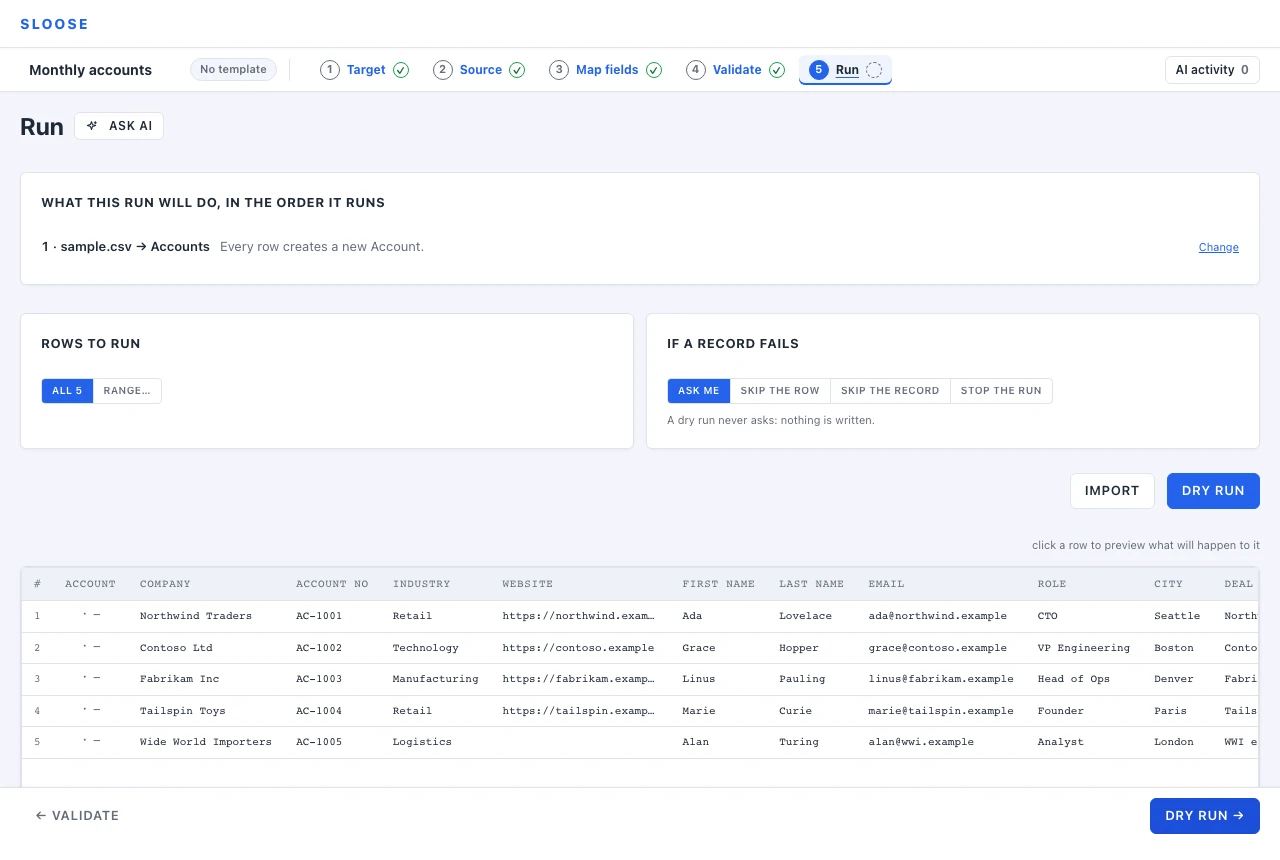
Section titled “What stops a dry run”When Validate has found something that would stop the run, Run says so first: Two things to fix before a dry run, one line for each, each with the way to it — Map it → for a column or a value, Decide → for which rows, Fix it → for a file, Choose → for the connection or the modules, See it → for a check across files — and All of them on Validate. Dry run and Import wait until they are fixed, and say so beside them.
Dry run first
Section titled “Dry run first”A dry run goes through every row and every rule — matching, formulas, value maps, validation — and writes nothing.
What it proves: your formulas run against real data, your match rule finds the records it should, your value maps cover the values in this file, and the row count is what you expected.
What it does not prove: that the CRM will accept every record. Field-level rules on the destination — a validation rule, a unique field that already holds the value — only show up on a real write. So does anything a workflow rule does, and only on a run with Run my workflow rules ticked: without it Sloose asks Zoho to run none.
Links between files are predicted, not guessed at. With more than one file, a dry run knows which records the real run would create, so a contact that links to an account says would link to the Account this run creates rather than reporting a link it cannot find. Nothing is written either way — the dry run is telling you what the real one would do, which is the only thing it is for.
A dry run never stops on an error, whatever the settings below say. It writes nothing, so it waits only after a row that looked something up in your CRM, not after every row.
Do it anyway. Most problems are the kind a dry run catches, and it counts as no run and writes no record (the searches it makes in your CRM are API calls like any other). Until one has passed, Dry run is the button that leads. Once it has, the panel it ends on offers Import n rows, and so does the footer’s button.
After any run, that panel leads. What another run would do — the decisions below, Dry run, Import and Reset — waits folded under Run again…, one click away.
Import asks once
Section titled “Import asks once”Pressing Import does not write. It says how many rows the run will send and which modules it creates or updates, and waits for a yes — the one question between a screen and a CRM. A resume asks it too. A dry run asks nothing. A retry asks too, in a line under the panel’s buttons rather than a dialog, because its rows may no longer be the ones you agreed to: see Retrying failures.
Authorisation, and what can stop a run
Section titled “Authorisation, and what can stop a run”Before writing anything, Sloose asks the server for permission for this many rows. That check happens once, at the start.
The consequence is the useful part: your allowance cannot run out half way through. Either the run is refused before it writes a single record, or it has the allowance for every row it declared. There is no state where a thousand rows are in and the rest are locked out because the month ran dry.
Of your plan’s limits, one can stop a run part-way, and it is not the monthly allowance. (A run can stop for reasons that are not the plan’s: you cancel it, If a record fails stops it, or your CRM’s API credits run out. Resuming picks up after any of them.) Every row is admitted before it is written, checked against the lower of two numbers — what was declared at the start, because the number at the start is one the browser supplies, and what your plan allows right now. A row that would cross that line is refused before it reaches your CRM, never after — a run that never tries to cross it writes every row and finishes normally. A run that IS stopped stops there: what it wrote is on the run report, which says which rows — as far as Sloose can tell one landed (see A record the CRM never answered for below).
There are two ways to cross it, and the panel the run ends on says which: Stopped at the plan’s 500 rows, or Stopped at 500 rows for the run’s own number.
Your plan changed while the import was running. The rows-per-run limit is checked against the plan as it is now, on every row — so a subscription that changes under a long import applies to the rest of it, but the ceiling is never lower than what the run has already written. Declare five hundred rows, write ten, then downgrade to a hundred: the run keeps going, because ten is under a hundred — it stops only once a row would take it past whichever is higher, the new limit or what it has already admitted. A row already admitted when the plan changes still lands — finished rather than abandoned half done — and nothing past that line does. The run report, not the number, is what says where it got to.
Or an import tried to write more rows than it declared it would, which should not happen — if you see that, tell us, and do not retry until you have read the report. It stops exactly the way the plan case does: on the row that would cross the number the browser declared at the start, before that row reaches your CRM. The report, not the number, is what says where the import got to.
A set bigger than your plan allows in one run is refused with LIMIT_ROWS_PER_RUN before anything
is written — narrow the row range, or run smaller subsets separately (the limit counts every row
across every file in the run, so splitting into more sources in the SAME run does not help). When
the period’s import runs are used up, a real run is refused with LIMIT_RUNS; dry runs still work. A run counts once, when it sends its
first row to your CRM — even a row your CRM turns down — so a dry run, or a run cancelled before its
first row, costs nothing, and neither does a free Retry failed (see
Plans and limits for which retries are free). A plan runs a number of imports at once in an
organisation; when that many are already running or starting, a real run is refused with
LIMIT_RUNS_CONCURRENT, whose runsConcurrent says the number, and the Run step says to wait for
one of them to finish, then run this one again. See Plans and limits.
If a record fails
Section titled “If a record fails”What a real run does when the CRM rejects a record:
| Ask me | Pause on each failure and show you what happened. Good for a first run of an unfamiliar file. |
| Skip the row | Record the error, abandon the whole row, continue. |
| Skip the record | Skip only the record that failed — the row’s other records still import. |
| Stop the run | Stop at the first failure. The rows already in hand (up to ten at a time) finish first. |
Skip the row and Skip the record differ only when a row writes to several modules. If a contact fails but its account succeeded, Skip the record keeps the account and Skip the row still keeps it — the account was already written — but stops trying the rest of that row.
For a file you have run before, Skip the row and a look at the failures afterwards is usually the right shape. A dry run never asks and never stops on a failed row; it records it and goes on. Stop, or a spent day at the CRM, can end one early.
A record that links to one that failed waits for it. When an Account fails, a Contact that looks it up by value — from another row, or from another file — fails too: waiting on Account 10231, which failed. It is never written without its Account, and never linked to an older Account in the CRM that happens to have the same number. Retry failed runs it again after its Account. Only that Account holds it back: another row’s failure never does. A Contact whose Account is in neither the import nor the CRM goes as its lookup’s If none match says — by default without one, with a warning on the row. A Contact linked to the Account its own row makes is not tried under Skip the row; under Skip the record it is written without the link to its failed Account, and the run log says so.
Zoho workflow rules
Section titled “Zoho workflow rules”On a Zoho CRM connection the Run step has a checkbox, Run my workflow rules, off unless you turn it on. Off, every record this import creates or updates is sent to Zoho asking for no workflow rules to run on it: a create, an update, either kind of batch and a value filled after the save all say the same thing. On, each says that your workflow rules should run, whether it makes a record or changes one. The choice is kept with the import and with a template made from it, and an import or template from before this existed has it off.
We measured it on a real CRM with a rule that changes a field: asking for no rules stopped it on creates and on updates, one at a time and ten to a call, while asking for workflow rules, or saying nothing, ran it on every record. Sloose does not ask Zoho to run approvals or blueprints. Nothing here says what Zoho does with them.
Writing records through the API. The records routes (POST and PUT under /orgs/{org}/connectors/{id}/records/{module},
and their batch forms) ask Zoho to run no workflow rules unless the write asks for them. Send automations: true in the body to ask
for the CRM’s workflow rules on that write; leave it out, or send false, to ask for none. A caller, or an open browser tab from
before this switch existed, that sends nothing therefore runs with the rules off.
A workflow function that calls Zoho spends your API credits, and Sloose cannot see those calls. The Run step says so under the plan while the switch is on.
Records that already match
Section titled “Records that already match”On a Zoho CRM connection the Run step has a second checkbox, Leave records that already hold these values alone, off unless you turn it on. Off, every record the import finds is updated as the rows say, whether or not it would change. On, where a module’s rule is to update the records it finds, a record the import finds that already holds every value a row would write is not written, and the row is reported as Unchanged when none of its records is written (a dry run says Would leave unchanged when none would be). A row where one record is left alone and another is written is reported as Written. A module whose rule skips the records it finds, or one held back by an update guard, reports Skipped, as it did before.
What turning it on costs, and what it saves:
- Zoho is never told about an update that is not made. Its Modified Time does not move, and a workflow rule that runs when a record is edited (on a run with Run my workflow rules ticked) does not run for it. Some CRMs rely on one or the other, which is why the choice is yours.
- Unchanged rows are not written, and are not counted as rows imported. No write call is made for them (finding the record still reads it), so a re-import where most records already match writes only the ones that changed. The run’s size is still checked against your plan’s rows per run before it starts, as it is for any row that ends up skipped, and a run in which every row is unchanged sends nothing, so it is not counted as a run.
- A record is only left alone when Sloose can show it already holds each value. It compares what the row would send, after the row’s formulas have run, with the record as it was read for the match, field by field, by what each field is: text exactly, a picklist the same option, a multi-select the same parts in the same order, a checkbox the same value, a number the same number, a date the same day, a date-time the same moment in any offset, and a lookup the same record. Text means text, long text, email, phone and website fields, and a blank value matches a blank field. Anything it cannot tell, a number written with more than 15 significant digits (a whole number that long is left alone only when both sides are the same digits), a field the match did not read, a kind it does not compare, is written as usual.
- A record with other work for the row is written as usual. A record that has a field filled after the save, or a note or an attachment added to it, is not left alone, since leaving it would drop that work. A record with lines (a subform) under it can be left alone, and its lines are still replaced.
- A record this run has already written is not left alone, and neither is one read more than two minutes before the row’s turn, or one whose read time is not known.
The choice is kept with the import and with a template made from it, and an import or template from before this existed has it off. A Retry does not take unchanged rows: nothing failed for them.
Rows to run
Section titled “Rows to run”Each file has its own line. All n runs every row of it the cleaning keeps: a row excluded or held back by a filter on Source is never run. Range… runs the rows you give it, by their numbers in that file as it was read — rows 1 to 50 of a file are the rows numbered 1 to 50, whichever of them its cleaning keeps, not the first fifty it keeps — which makes a small trial batch. One file’s range leaves the others running every row. A range is not a way to pick up a stopped run: Resume at row n on the panel the run ended on does that, and skips the files already done.
Notes and subform rows in a dry run. A note is never sent in a dry run: the log says, row by row, that it would add one to the record after the record is saved. A file that is the rows of a subform says Would be written where its parent would be replaced, and Not replaced or No parent where the real run would leave it alone, as a real run says them.
What this run will do, in the order it runs
Section titled “What this run will do, in the order it runs”One line for each file and module, numbered in the order the run takes them, says what its card on Map fields decided — Each looked up by Account Number. Found: updated. Not found: created. Several: the first is used. A module matched on its key alone says what a row that finds none does: Each looked up by Account Name. Found: linked to. Not found: created, holding only its Account Name. under Some may exist, and Each looks up its Account by Account Name to link to. Not found: left out. Writes none. under Updates only. Each line comes with the Which rows rule and the update only when guard beside it, and a Change that takes you to that module’s Which rows & existing. A file that looks up records another file makes says why it runs second: Runs after accounts.csv: it looks up the Accounts accounts.csv makes. Run states the decisions and does not ask them again: they belong to the module and the file, and a run only carries them out.
Save order
Section titled “Save order”When a row feeds several modules that link to each other, the order they are written in matters: a contact that points at an account needs the account to exist first. Sloose works the order out from the links you mapped, and the Save order card here shows what it decided, and why — A Contact links to its Account for a formula over the row’s records, A Contact finds its Account by search for a lookup on a field the file fills — so Accounts save first. Switch it from Auto to Manual to swap neighbours if it has guessed wrong; match the links puts it back.
The card appears only when there is something to decide. Modules that do not link to each other can be saved in any order, so nothing is shown rather than a choice that makes no difference.
Two more things order the modules on Auto. A module whose Which rows rule, or whose update guard,
reads another module’s record (rec.Account.Name in a rule on Contacts) is saved after that
module, as one whose mapping links to it is. And a lookup by search waits only for a module this
file sends a record to: one it only finds (Updates only) with nothing but its key mapped makes
nothing and changes nothing, so it is no link and nothing is said of it in any order.
A manual order that saves a record before one it links to by a formula — a Contact before its Account — fills that link after the Contact is saved. A lookup found by search cannot be filled afterwards: where the file fills the field it searches by, and it is saved before the module it searches, a row whose Account this import makes finds none, since it does not exist yet. Validate stops the run there and names the lookup, where the searched module can make records for this file, and match the links puts the order right where Auto would save the searched module first. Auto can save such a lookup first too, where other modules look each other up in a ring and hold every module back; then Validate and this card name the module to put first under Manual. Where the searched module makes none (Updates only, and no new record when several match) Validate warns and the run may go: an Account already in your CRM is found whichever is saved first, unless this import changes the value the lookup searches by: one it is writing in is not there until the record is saved, and one it is replacing (a renamed Account searched by its old name) is not there after. A lookup that searches by another value than the one the import writes into that field is warned of here and in Validate in whichever order, since no order serves a lookup by the value replaced for every row. (A search on a field the file does not fill is not held to an order: no record the file writes could be found by it.) Modules that search for each other in a ring have no order that serves them all; Validate says so, and one of the lookups has to go, or become a formula over the row’s records. Where another file links to the same Accounts by value, the run refuses that order, and so does Validate: a Contact saved before its Account is tried could not be held back by an Account that failed, while the other file’s Contacts would be.
While it runs
Section titled “While it runs”Records go to Zoho up to 10 to a call, and the live log shows each row as it is answered (how the calls are made up is later in this section). You can pause and cancel.
You can look at any other part of the import meanwhile: the run goes on, and Run on the step rail brings you back to it.
You can leave the import too — for your imports, another import, Settings, anywhere in Sloose — and the run goes on in that browser tab to its end. The bar at the top says so wherever you are: ↩ Back to Spring contacts · running, or · a question is waiting when a failed row needs your answer. The run waits for that answer until you come back to the import. Opening the import again while the run goes takes you back to it, with every row it has written meanwhile.
Keep the tab in front for a large import. A browser slows a tab you can’t see, and the run is made by the page, so a run in a hidden tab goes on but more slowly: in one test, on one Mac in Chrome, a hidden tab made calls at well under half the speed it did in front. Other browsers, a minimised window and a closed lid were not measured. A run that is cut off can be resumed.
Leaving before the run has started — while Sloose is still checking your allowance — gives that start back, and Sloose says so wherever you are. A free retry is the exception: once it is approved it starts anyway and runs to its end without you — and from the moment you press Retry, a run of another import in the same tab is refused, as it is while any run goes.
When a run ends with nobody on its import, Sloose says how it ended — Spring contacts: All 120 written, or Stopped at the plan’s 5,000 rows — with View to open it, and the bar says · finished until you open the import or dismiss the line with ×. Signing out takes both away: they belong to the session the run was started in.
One run at a time in a tab. While one is going:
- starting a run of another import is refused — Spring contacts is running in this tab. Let it finish, or cancel it, before starting another.;
- moving to another organisation, creating one, joining one by invitation, leaving or closing the organisation the run is in, and deleting your account are refused, since each would end the run — A run is going in Spring contacts: let it finish, or cancel it, first.;
- turning your authenticator app on or off is not refused: it signs you in afresh as the same session, and the run goes on under it;
- Sign out asks first, opening on Keep running: signing out stops the run, and the rows it has not reached are not written. Sloose closes the run before signing you out, so its history says it was cancelled — unless Sloose can’t be reached for a few seconds, when you are signed out anyway and the run is marked abandoned a couple of minutes later;
- closing or reloading the tab asks first: a run belongs to its tab, and stops with it. The tab tells Sloose as it goes, and Sloose ends the run within seconds, so the import opened again shows where the run stopped, with Resume there, rather than a run “in another window” for the two minutes before Sloose would have noticed. A tab that crashes says nothing, and Sloose notices within those two minutes. Inside a CRM, moving to another module takes the tab down too, and its run stops then.
Sign out in another tab that shares this tab’s sign-in — another Sloose tab in the same browser, or inside your CRM another tab of the CRM — asks too, opening on Keep running: A run is in progress in another tab; signing out stops it. The rows it hasn’t reached won’t be written, and the rows it has begun may be left unfinished. Sign out anyway and the run stops when its tab hears that you have signed out; Sloose cannot close it from the other tab, so it is marked abandoned a couple of minutes later. Moving to another organisation in another tab asks the same way: switching, creating one or joining one, outside your CRM, where every tab shares the sign-in. Leaving or closing the organisation the run is in, and deleting your account, say it in their own confirmation, in the same two sentences as Sign out: the rows it hasn’t reached won’t be written, and the rows it has begun may be left unfinished. None of them is refused from another tab, since the run is not that tab’s to stop.
Sloose writes a file’s records to Zoho up to 10 in one call, one module at a time: its new records, its updates to the records it matches, and the fields it fills after a record is saved. A call of up to 10 records costs one API credit, where a record a call costs one each. Rows are taken ten at a time. A row that depends on another row’s record — it looks up a record that row creates, or names the same record — waits until the call that writes it has been answered, so those go in a later call and a run with many such rows makes more calls than its rows divided by 10. The searches that find existing records, and the records it reads back, are calls too. What the run writes, and what it says of each row, is the same as writing a record a call; a record Zoho refuses is refused alone — its row says why, and the rest of its call is written.
A run waits after each row or batch of up to 10 rows it writes, and — when the wait is set above zero — after each batch of lookups it asks. The wait is set per connection. It is a pause in the tab that runs the import, and is not shared across runs, tabs or organisations. Written a record a call, it is not a gap between every write: a row can write to several modules with no pause between them. Where records go up to 10 to a call, the pause comes between those calls, so one batch of Accounts and the next batch of Contacts have the wait between them. An administrator can adjust it as Pause after each row or batch on the connection’s Writing page, under Connections, as a whole number of milliseconds from 0 to 60,000 (anything else is refused where it is typed, never rounded or stored); left empty it is 200 milliseconds. A longer pause slows a run down, and it is not a reliable way to save your CRM’s API credits: Zoho limits the calls in flight and a rolling 24-hour pool of credits, not calls per minute. A run looks up a file’s linked records, those found by a column’s value, and the records its rows match, in batches ahead of its rows where it can. With a pause above zero it asks one batch at a time, each followed by the pause, and looks up any other value as its row reaches it; left empty or at zero, it asks the batches and those other values four at a time before its rows, with no wait between them.
When the CRM asks for fewer calls, or does not answer, the run waits. A call the CRM declines for its rate (Zoho’s TOO_MANY_REQUESTS) is made again after the wait the CRM asks for — at most half a minute — or after one second, two, then five, over four tries in all. That includes a write: the CRM did nothing with a call it declined, so sending it again cannot make a record twice. A read the CRM does not answer — the connection dropped, or Zoho failed on its side — is asked again over about half a minute. A call is given 30 seconds to answer, a minute for a write; one that takes longer is given up on, and a read that was is asked only once more, since the CRM may still be working on it. While the run waits, the foot of the Run step says so (Waiting for the CRM — Zoho is turning calls away for now · 4 s; the seconds are how long the run has been waiting, counted across waits that follow one another, and the line stays a moment after the last), and the log says each wait. Only a failure that outlasts its tries reaches If a record fails.
A write the CRM did not answer is never sent again on its own: it may have landed, and sending it again could make the record twice. It goes straight to If a record fails.
Once a read has used all its tries with no answer — about half a minute, or about a minute when the CRM kept a call past its time — the run stops waiting. Each row after that asks the CRM once and fails at once, until anything it asks is answered. A run that skips failed rows through an outage therefore does not wait on every one of them.
If the CRM’s API allowance for the day is used up, the run stops there, whatever If a record fails says, and its log says why: every row after it would be turned away the same way. The row whose call was refused, and the rows after it, are left, not failed: they are counted with the rows the run did not reach, the results file says Not reached of them, and Resume takes them again once the CRM allows calls. A row left part-way — its Account made, its Contact not sent — keeps the record it made: the results file names it and says the rest of the row was not written, and the resume carries it, so nothing is made twice. Zoho uses the same answer for that and for its limit on calls at once. When Zoho says how many calls are left today (it does once half the day’s allowance is spent), Sloose knows. When it does not, a run whose calls are declined for the CRM’s rate through every wait three times running, with nothing answered in between, stops as most likely having used up the day’s allowance, and says that is what it thinks. Any call answered in between starts the count again.
Before you press Import, the Run step says what is known of the CRM’s day. For Zoho, a call costs one API credit today. Zoho says how many credits are left only once half the day’s allowance is spent, on any call at all, and that count is kept for the CRM, not the connection: every Sloose organisation holding the same CRM spends the one pool, so a count read through any of them is the others’. Sloose says the count as Zoho gave it. From the CRM’s licence (which Sloose reads when you connect, at no cost in credits) it also works out the size of the day — from Zoho’s published table of editions — and says so. For the Free edition it says “at least”: Zoho’s own API dashboard has shown a Free CRM more than the table publishes.
Sloose does not predict how many calls a run will make. How many it takes depends on what your CRM already holds and on what each row finds, which no file shows, so no figure is given before a run. There is one warning, from the fewest calls a run that reaches its last row could make: for each file, the rows that hold something for the first module it saves, where that module is made all new with no Which rows rule and no search lookup, divided by how many records go in one call. Every later module counts nothing, since a record your CRM refuses can end its row there. Where even that is more than Zoho last said was left, or more than your CRM’s licence gives in a day, the note and the question before Import say so: by Zoho’s last count, and when it was, the run needs more than was left. It does not say the run will stop, because Sloose cannot know that: Zoho’s count can be up to a day old, credits return over a rolling 24 hours, and a licence’s figure leaves out add-on credits. That is a warning, never a refusal: you can still run it. A run the warning says nothing of may still run out: if the credits run out the run stops as above, names the rows it did not reach, and can be resumed once some return.
A day Zoho has said is spent is different: a run that writes is not offered. The Run step says when Zoho said so,
holds Import, Resume and Retry, and offers Check again, which asks Zoho with one light call (at most
one a minute while the day is held spent). When it finds Zoho answering, the hold goes. A run
that writes, asked for while the day is still spent — from another tab, or through the API — is refused
before it starts (DESTINATION_ALLOWANCE_SPENT): nothing is claimed, and no run is counted. A dry run is not held,
but the searches it makes are calls like any other and are turned away while the day is spent. Sloose names no time
for the credits’ return, because Zoho names none: it counts them over a rolling 24 hours.
What Sloose cannot see it says: add-on credits, and what your CRM’s other apps have spent today. When the run ends, its log says how many calls it made and, where Zoho gave counts, how far the CRM’s own count fell while it ran — which includes anything else using the CRM at the time.
While a run holds the import
Section titled “While a run holds the import”A run started somewhere else — by a colleague, by an API token, or by you in another window — holds the import until it ends, and the import bar says whose it is: Sam is running this import. You can open every part of the import to look, but nothing changes: an edit is refused, and says why — Sam is running this import — wait for it to finish before changing the data.
Asking waits too. A guess made now could not be used until the run ends, so none is made: every Ask AI that proposes guesses — on Source, on each part of Map fields, and in the formula editor — and Generate for a sample, the draft’s Draft everything and Without the AI, the template check’s Fill the gaps, Guess without the AI and a field’s Auto-map stay on the screen, disabled, each saying why: Sam is running this import — wait for it to finish before asking the AI (or before drafting, or guessing). Nothing is sent and nothing is charged, and they come back the moment the run ends.
An answer already on its way when the run starts still arrives, and a draft already going finishes the part it is on, then stops there and says why. What they propose waits with the rest of the import until the run ends, and is saved then. Leaving the import before it ends would leave those guesses behind, so Sloose asks first — and so does the browser if you close the tab. Going Back leaves without asking, and says afterwards that they were not kept.
Validate’s Ask AI, Run’s own, Explain on one of Validate’s problems and Explain on a run’s error group all land guesses, so they wait with the rest.
Resuming
Section titled “Resuming”A run that stops part way — you cancelled it, its If a record fails setting stopped it at a failure, the plan’s row limit stopped it, or this window stopped answering and the import was let go — ends on a panel that says where. Resume at row n (after the limit, Import the other n) starts a run from the first row it did not reach, file by file, so the rows already written are not written again. It is a new run, and counts as one.
Where a run stopped in a file’s last rows, with rows left part-way and no row after them, Resume is offered at the first row it has to finish (Resume at row 2) and finishes those rows.
A resume retries the rows that failed, too. Where the stopped run left failed rows as well as rows it didn’t reach, the panel offers Retry and Resume. Retry runs the failed rows alone, and a resume after it picks up the rest. Resume does both: it retries the failed rows first, keeping what each already holds, then walks the rest. Its question names them (It also retries row 3 and row 7, which failed) and counts them. A row that fails again is a failed row of the resume, with its own Retry. Under If a record fails: Stop the run, the resume stops again at a row that still fails: exclude the row on Source, or choose Skip the row, to go past it. A resume takes at most 1,000 failed and left rows by name (the rows that got no answer are counted apart, up to 1,000 of their own): past that, Resume waits, says how many failed, and says to retry them first. If they fail every time, fix what they fail on, or exclude them on Source.
After a retry, rows the retry got no answer for. Where the resume looks a row’s records up first (they match on a value the row gives), it takes the row along and updates or makes what it finds. Where it can’t (All new, a blank match value, or If several match: Create new), whether the retry made the record isn’t known, and Resume waits and says why: retry those rows first, which sends them again and says afterwards that a record may exist twice, or exclude them on Source to leave them. An update Zoho didn’t answer is retried like any failed row, since it names the record it was sent to. Rows of the run before that the retry never reached are not the retry’s: Resume asks about them as it does after any run.
When you come back to an import whose run stopped short, Sloose can’t always tell which of the last rows it was writing had finished: a run writes up to ten rows at a time, one module after another, and a row is only recorded as finished when it ends. A window that went away mid-run (the tab was closed, the browser crashed), a sign-out or a reset can each leave rows part-way, and what is kept of the run doesn’t say whether one did. So a resume of a run you have reopened (other than one that stopped in order, below) goes over the last rows that run wrote, up to ten of them, and names the first of them before it starts. What each row already holds is kept and not made again; what it was missing is written. Retry does not do this: it runs only the rows that failed. If the panel offers both and you press Retry first, press Resume afterwards, which still goes over those rows. A run stopped because the CRM’s API credits ran out is the exception where it recorded which rows it left: a resume finishes exactly those, and such a run never counts as stopped in order. Where that record never arrived, its last rows are gone over like any other run’s.
A run that stopped in order isn’t gone over. When you press Stop, or the run’s own Stop the run ends it, the engine finishes every call of the rows it had begun and then stops, and its page says so as it closes the run. Sloose keeps that word, and a run that says it stopped in order is reopened without its last rows being gone over: Resume carries on from the next row. A run a sign-out, a reset or a replaced session ended part-way through its rows, one nobody closed, one the CRM’s credits stopped, and one whose failure reports did not all arrive say nothing of the kind, and are read the careful way above. A write the CRM never answered takes the word away too, whether it was recorded before the run closed or after.
A retry that stopped short is picked up by retrying. When you come back to one, the last rows it wrote, up to ten of them, are marked may be unfinished: counted as written, with that mark, and not called failures, each keeping what the retry made of it. Retry takes them with the rest and writes only what is missing. The rows it never reached still show as failed, under the failure the run before recorded. That is so whether or not the run before is still in the import’s history. A row that holds only records an earlier run made, and that the retry never began, can’t be named where the run before has been removed, and the panel says so. Where the history just couldn’t be read (a dropped connection), Retry is held and the panel says to reload the page, which reads it again. A retry that stopped in order (above) is not gone over: its last rows are taken as written.
Rows a run had begun that left nothing behind are finished too. A run writes each module’s new records, then its updates, as separate calls, so a window that went away between them leaves rows with nothing recorded beside rows that hold a record. A resume names those rows before it starts (“It also finishes row 23 and row 24, which that run left unfinished”; for more rows than fit, one after another, “It also finishes rows 3 to 12”) and writes them. The “also” is there because the resume does more than finish those rows; where they are all it takes, the sentence begins “It finishes”.
When the CRM’s day of API calls runs out mid-run, the panel says how many rows the run had begun and left part-way, and how many of them already hold a record: those are counted as not reached, not written, and Resume finishes them without making a record twice. On a run that stopped short and is reopened, the last rows it wrote are counted written but said apart (“3 written (2 may be unfinished)”), and each is marked may be unfinished beside its record in the table, because what was recorded can’t say whether the rest of the row was written.
A resume walks what the stopped run was set to, even after the import is reopened: the files in the order that run met them, each within the rows it ran. Sloose keeps that with the run, because the row ranges you set on Run aren’t kept with the import. If a file’s range on screen now differs, the panel says so (Resume carries on as the stopped run was set: rows 4–5 of contacts.csv. The range set now, all rows of contacts.csv, is for a new run.), and the resume still follows the run’s rows. A file you replaced since, or added after the run, isn’t held to the run’s range: one added is part of the rest. When the files or their rows have changed so that Sloose can’t tell which rows the run didn’t reach, Resume isn’t offered, and the panel says so. Running the whole import again reaches the rest. It also walks every row already written, and where a module makes All new records, each of those gets a second record.
A resume that stops can be resumed too, and that holds after the import is reopened. Sloose reads which rows the runs before it walked from those runs’ own records, so the files they finished stay finished and the rest begins where the resumed run stopped. Where those runs can’t all be read, Resume isn’t offered and the panel says why. If a read failed, the panel says to reload the page, which reads them again: do that before anything else. If a run has passed out of your plan’s history, a file it read has changed since, the import has been picked up more than ten times in a row, or one of those runs didn’t record where it began, a reload changes nothing and the panel doesn’t suggest one. Running the whole import again walks every row, and where a module makes All new records, a row that was already written gets a second record. The Import question says how many rows already hold records where it can tell. Where the earlier runs weren’t read, or couldn’t be, it says the number may be more.
The same holds after a retry of a run that was picked up part-way: the count takes in the rows before where it was picked up, or says the number may be more.
Which rows count. In a module that makes All new records, every row that already holds a record. In a module that matches, a whole run finds a row’s record and makes no second one, with two exceptions, and the count takes in both: a row whose match value is blank now, made or found before, which the run has nothing to look for and so makes again (not under Updates only, which passes such a row over, and not in a module with nothing mapped but its match field, which makes nothing from a blank), and every row the run made a record for where If several match is Create new. With If several match left on Ask me, nothing is counted: a second record is made there only when you answer the question that way for a row.
A dry run made after a run that wrote rows says so. A dry run goes through every row, the ones that run wrote among them, so its counts are what a whole import would do, not what is left to do. Where a whole import would make some of the last real run’s rows a second time (by the rules above), its panel says how many, and the Import question says it again before anything is written. If that run stopped before its last row or left failed rows, the panel offers Show that run, which puts it back on screen with what its own panel offers. A reload opens the import on the dry run again, with the same button.
If the import has a run your page isn’t showing — one made in another tab or by somebody else since the page read it, or your own, after Reset or a file replaced or read again — nothing that writes is started from that page: Resume and Retry of the older run are refused, and so is Import, whether the page shows an older run or has not yet shown one at all. The rows they would write may already be written. The page says so and reads the newest run, and you carry on from that one; if the newest run doesn’t appear, reload the page. Running the whole import again is still yours to choose once the page shows what is there, and its question then counts the rows that hold records. A page that is connected hears of the other run as it happens; this is for one that didn’t. A dry run writes nothing and is never refused for a run your page isn’t showing (and it doesn’t count as having seen one: Import after it is still checked against the real runs). Where it is the import itself that was changed elsewhere — a mapping, a file, a setting — and your page hadn’t heard, no run is started, a dry run included: the page says so and catches up.
A resume never passes over a row the CRM never answered for. When the stopped run sent a new record and nothing came back, the record may or may not be there. The panel names each such row before where the resume picks up (Row 8 got no answer from Zoho, so it may or may not be in your CRM), and Resume takes them with it:
- A row whose module matches its records is looked for first. It is updated (or left, as the match rule says) if it landed, and made if it didn’t.
- A row whose module makes its records All new can’t be looked for — nor can one whose match field is blank on that row. A row whose module’s If several match is Create new is treated the same way, because Sloose can’t tell which case it was in. If its first search found several records, sending it again may make another; if it found none, the resume would find what landed and update it. Resume asks whether to send it again, which may make a second record if the first send landed. The question names the record so you can check the CRM first. Leave it is the default, and the resumed run’s summary says what it left (row 8 from the run before got no answer and was left).
What the stopped run made of those rows is kept with the resume, so a record it did make is never made again: not by the resume, and not by a retry or a resume after it. A row that is no longer among the rows the resume runs — struck out or filtered since, or outside the range the stopped run ran — can’t be taken, and is left and said to be. What a resume left is still said when the import is opened again — and by a retry after it — and a resume after it leaves the row too, without asking again. A row a resume took but stopped before reaching is still owed, and the next resume — after a retry too — takes it again, and says the run before took it and stopped before reaching it. A row whose module the file no longer writes is left too, and said. More than 1,000 such rows are more than a resume carries: Resume waits, and Retry takes them.
While the CRM’s last answers to a run’s writes are still being written down, Resume and Retry wait. The panel says so, and the page checks again by itself every quarter minute. It stops holding the buttons at the first check that finishes after twenty minutes, counted by the clock whether or not the tab is in the foreground (a tab in the background checks less often, so that can be later than twenty minutes), and a press made before the run has settled is still refused by the server. A visit to another step and back does not start the count again. Sloose gives the CRM’s last answers time to arrive before writing down which writes got none. Until then, where the rest begins can still move, and what a retry would carry over isn’t yet whole. There is no further wait for the CRM to catch up: a record it made without telling Sloose is found by the CRM’s query at once. (A create the CRM finishes after a minute, once the retry has looked, can still make a second record; the results file says so on the row.) Both wait for every run before it in the chain — the run it retried or picked up, and the one before that — in the same way. The page checks again by itself. In the rare case that Sloose couldn’t write down all of the CRM’s answers to a run, it can’t tell which rows were made, and neither Resume nor Retry is offered for that run or any run after it: check the CRM, then run the import again.
What a resume counts against your plan. A resume of a run you stopped is a new run, and counts as one of the month’s runs. Two kinds of stop are not your choice, so their resume counts none: a run whose page went away (the tab closed, the browser crashed) and a run the CRM’s API credits for the day stopped. Its rows are counted as any run’s are. That holds while the files and the setup are as the stopped run left them: change either, and the resume is a new run. A run whose page went away is resumed free once, and within the three free retries a run keeps; a run the CRM’s credits stopped is resumed free every time, however many days it takes. The panel says which before you press Resume.
When rows failed before it stopped, the panel offers Retry n failed rows first, with the rest beside it: a resume is a new run, and the failed rows would leave the screen with the run they belong to. Once the retry has run, the rest is offered again.
Worth knowing what this does and does not do: it picks up by row, not as a transaction. Records already written stay written.
What failed
Section titled “What failed”When rows failed, the panel a run ends on says what went wrong, one thing at a time: 2 Accounts refused by Zoho, the rows by their numbers in the file, and the code with what it means — DUPLICATE_DATA — Account Name: already used by another Account. Rows that failed for the same reason, in the same file and module, are one group however many there are, so a hundred rows with one bad column read as one thing to put right. Rows waiting on a record that failed are one group too — 3 Contacts waiting on a record that failed — and go when their parents do. A write that never heard back is said by who didn’t answer: Zoho didn’t answer for 1 Account, or The connection dropped for 1 Account when the request may never have reached Sloose. Either may have been written. A failed search or read is never said as either, because it wrote nothing. If Sloose lost touch with the run for long enough to end it, the panel shows the run as Sloose recorded it once the page can reach Sloose again, so it agrees with the history and the results file. Show rows shows that file’s rows with errors in the table below. Go to fix goes to where a refused value is put right: for a field read straight from a column, Source, with the group’s first row in view and its cell open to correct; for a picklist or a lookup read from a column, its values on Map fields, since what was sent is what the column’s value became there; for a field written by a formula or a fixed value, its mapping.
Explain on a group asks the AI about those rows — Why did these fail?, How do I fix them?, or your own question — and sends it the rows that failed, not the first rows of the file. What it proposes lands on Map fields as guesses — a mapping, how an existing record is found, a value’s translation, or a rule for which rows a module takes or when a found record is updated — each line of the answer saying where it went with Go there, and nothing changes until you use one. An update rule for a module that makes every row new is said rather than offered, since no row finds a record to update; Undo turns them all down while none is used. A fix for something you have changed since the question was asked is not offered, and the answer says so. The conversation is kept with the import at that failure, so the same failure on the next run carries it on, each line still with Go there.
Asking the AI about the run
Section titled “Asking the AI about the run”Ask AI beside Run’s name asks about where the import stands with its run, and what it suggests follows that:
- Before any run: What will this run do? and Is anything likely to fail? It is sent Validate’s problems, if there are any, and the run as it would go: each file in the order the run takes them, with how many rows it sends and its modules in the order they are written.
- After a run with failures: Why did these rows fail? and What should I do next? It is sent the rows that failed, grouped by what they failed on.
- After a run with none: What did this run change? and What should I do next? After a dry run, the first is What will the real run do?
After a run, the AI is told the run’s recorded totals, which the server reads from the run’s history rather than taking from the page: whether it was a dry run, how it ended, the rows it wrote, made, updated and failed, and the modules it wrote to, including one the connection no longer has. A dry run writes nothing, so its history holds how it ended and the rows that failed; what the real run will do is told from the run as it would go now, which is sent after every run as it is before one. What it proposes lands on Map fields as guesses, with Go there and Undo, and the conversation is kept with the import at Run. While a change of yours is still being saved, a question about a run with nothing to fix waits for the save; if it still has not landed, the answer says so and asks you to ask again in a moment.
Retrying failures
Section titled “Retrying failures”After a run with errors, Retry n failed rows re-runs just the rows that failed, with whatever you have fixed in the meantime. A row whose record was written but whose note was refused or never answered is one of them: the retry adds that note, and does not write the record again. Rows that failed only because a record they link to failed are counted apart — Retry 2 failed and 2 waiting — and run again after it. Beside it, the panel says what the retry costs, where Sloose knows it: Retrying failed rows counts no new run, up to three times in a row; after a run the CRM’s spent credits stopped, Retrying failed rows counts no new run (picking such a run up is free, retried or resumed, whether or not it failed a row of its own and however many free retries came before it: once for each such run, and only where the run its chain began with was counted as a run); and where it does count (after a run the row limit stopped, one whose window stopped answering, a run whose free retry is already used, or a finished run that failed no row of its own), Retrying failed rows starts a new run, and counts as one of this month’s runs. Where Resume is offered too, each button’s cost is said. Where only the server can tell, the panel says nothing, and the run’s cost is on Usage & credits as always.
A failed row a retry did not take is still a failed row, once it is back in the file. A retry runs the failed rows that are in the file when you press it. A row you had struck out on Source, or that the row filter held back, is not among them. While it stays out, it is nothing to retry: the retry is done, and says so. Put back afterwards, it is listed again on the latest retry’s screen with the error it failed with, the panel leads with Retry, and the Run step in the side rail reads 1 row to retry. Rows a retry in between put right are not listed again; a row a retry in between wrote last before it was cut short is listed as one that may be unfinished.
That retry’s own results file says what was true when it ran, whatever the file holds now: Excluded of a row that was struck out on Source at the time, and Failed, with the error, of one the row filter held back. (Sloose follows an import’s retries back ten runs; past that the row is not listed, and a new run writes it. On a very large file, where reading the earlier runs would take more memory than the server sets aside for one file, the results file is still made and says nothing of such a row.)
A row a retry left part-written when the CRM’s credits ran out is retried, where there is nothing to resume. A Resume picks up where the first run of an import stopped. Where that run finished and it was a later retry the credits stopped, the row it had begun (its Account made, its Contact not) is one of the failed rows, in words of its own: the run stopped before the rest of this row was written; retry the failed rows to finish it. Retry takes it and makes nothing twice: the record the row already holds is carried to the retry. That holds on the screen of a retry made after it too, where the panel reads 1 row an earlier run left is not finished and leads with Retry, and the Run step in the side rail reads 1 row to retry. That later retry finished with no failed row of its own, so retrying from its screen counts as a run. A row the credits stopped on its very first call holds no record: it is a failed row too, and says the run stopped before this row was written; retry the failed rows to write it.
Pressing it does not run yet. A line under the buttons says what will: Only the 4 rows that failed run again (2 Accounts failed and 2 Contacts waited on them), with the 2 mappings you changed since the run; rows already written aren’t touched.
The rows are exactly the ones the retry runs. In brackets is what those rows’ records did last time:
- the ones that failed;
- the ones waiting on them;
- the ones a failed row never reached, such as the Contact after an Account that failed under Skip the row.
The retry runs those rows under the setup as it is now, so a mapping you added since can make it write a record that never failed. It names what you changed only when the run was made in this tab: after a reopen, Sloose can’t know the setup the run had.
Retry beside it runs them, and if the import changes while Sloose checks it first, nothing runs and you’re asked to press Retry again. Not now closes it.
This is the normal shape of a real import: run, fix a handful, retry. Rows that succeeded are not touched.
A record the CRM never answered for can end up there twice. When a new record is sent and no answer comes back — the connection drops, it times out, or the CRM fails on its side — it may have been made all the same, and sending it again, from the error’s Retry or from Retry n failed rows, can make a second one. Under Ask me, the question about it says so beside its Retry, before you choose. Sloose does not search for it first: a create the CRM finishes after the retry has looked can still be made twice, so it tells you instead: the run’s log warns about them, the run report lists them under Look for duplicates, and the results file says so in each one’s Error column. Those are the records to check.
Where the CRM refuses the second one, Sloose uses the record it names. If the module has a unique field, the CRM refuses the record sent again as a duplicate and names the record that already holds the value. Sloose then reads that record, and when your connection’s CRM user (the Zoho user the connection acts as) made it since this import’s runs began, it is used as the row’s record: nothing is made twice, nothing is refused, and the row’s later records link to it. The log and the results file’s Error column say so (an earlier attempt got no answer, and sent again the CRM named a record that already holds this value…). What Sloose can check is who made the record and when. It cannot tell the record its first attempt made from another the same user made in that time with the same unique value, by hand or from another app, so it says what it knows and not that the first attempt made it. A record somebody else made, one made before the import began, or a value more than one record holds is left alone, and the row fails as a duplicate.
The record is used as it stands. None of the row’s values are written to it, so what the rest of the import knows of it is what the CRM holds: a later record of the same row reads its fields as they are, and another file’s link finds it by the values it holds. If it holds a different value from the one your row sent in a field a link searches by, that link does not find it.
A retry needs the run it follows, so it is offered only while that run is in your history. Once a
run is past what your plan keeps, it is removed, and a retry of it is refused (RUN_RETIRED): what
it wrote can no longer be read in full, and a retry could write some of it again. Run the import
again instead.
What is recorded
Section titled “What is recorded”Every run puts a row in your organisation’s history: who started it, how many rows, what happened, which modules. That history is retained for as long as your plan says, and shows up under Results and history, on Settings → History & retention, and on the Imports and runs page of the connection it wrote through.
A dry run does too, marked as one — and counts against nothing. It holds the import while it goes, so nobody else runs it at the same moment, and it writes nothing. It is not offline: the searches for existing records are most of what a dry run is for, and those searches go through Sloose like any other.
The history says what happened, not what was in the file: your rows are kept with the import, not with the run. With each run, a dry run included, Sloose does keep what it did record by record — each record’s outcome, its ID in your CRM, the CRM’s reason when it refused one, and the values it was matched and linked by — for as long as the run stays in the history (what the history holds).