
AI credits
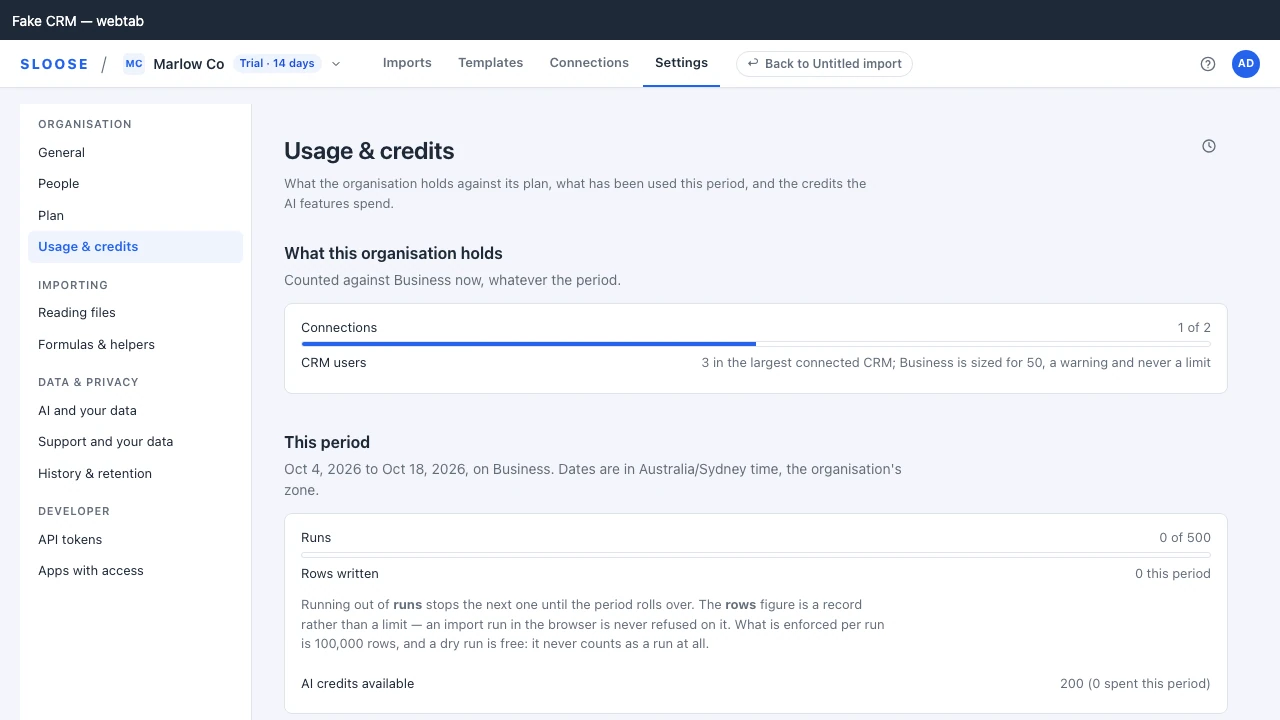
Every AI feature costs credits. Your balance, what this period has spent, and when to be told you are running low are under Settings → Usage & credits; current pack prices are on sloose.com/pricing.
Nothing else in Sloose consumes credits — importing rows does not.
Two pools
Section titled “Two pools”| Included | Come with your plan, each month: at the start of each billing period on a monthly plan, and each month of the year on an annual one. End with the month they came with, or sooner if the plan ends first. |
| Purchased | Bought in packs. Carry over from one period to the next, and expire twelve months after they are bought. |
During a trial the included credits are the trial’s: 200, granted once and ending with the trial — on its last day, or the moment you start paying, whichever comes first — not Business’s monthly allowance. The plan’s monthly credits start with its first paid month. Purchased credits do not end with the trial, and Usage & credits says how many the trial granted.
Included credits are spent first, so a pack you bought does not evaporate at renewal while your monthly allowance goes unused.
What each feature costs
Section titled “What each feature costs”| Feature | Credits |
|---|---|
| Auto-map | 6 to 24, by the file’s columns |
| Match | 3 to 10, by the modules asked about |
| Value mapping | 3 to 10, by the values asked about |
| File assistant | 5 to 20, by how much it reads |
| Explain and fix | 4 to 16, by how much it reads |
| Formula assist, and a helper written for you | 3 to 12, by how much it reads |
| Chat message | 2 to 8, by how much it reads |
| Fill in with AI | 2 to 6, by how many fields it is asked about |
Auto-map costs the most because it does the most: a proposal for every column, validated against your real schema before you see it. It is also the one that saves the most time, and it runs once per file rather than once per field.
Prices are catalogue data rather than constants baked into the app, so they can change; the billing page shows what you actually spent.
Reserve, then settle
Section titled “Reserve, then settle”A credit is not taken when you press the button. It is reserved, and settled when the call finishes — for what the call actually used.
A feature priced by how much it reads cannot know that until it has read it, so it reserves the top of its range — 16 for Explain and fix, 12 for a formula — and settles on what it read, never more. When your balance is below that top, it reserves what you have instead, as long as that covers the bottom of the range: with 10 credits left, Explain and fix reserves 10 and is charged 4 or 8 for what it read, or the 10 if it read a great deal. Only a balance below the bottom of the range — 4 for Explain and fix — is refused, and the refusal names that as the credits it needed.
If a call fails, the reservation is released. You are not charged for a request the model never answered. An unsettled reservation expires on its own, so a lost connection cannot leave credits stranded — and a call that finishes after its reservation expired is still charged for what it used, since the answer was given. That can take the balance below zero. Credits you already hold, or the next to arrive, pay that debt off once, and are used up in doing so: it does not come back when they expire. The same goes for credits taken back by a refund after they were spent. Settings → Usage & credits says so when a purchase pays a debt.
Refunds and disputes
Section titled “Refunds and disputes”A refund takes back the credits the refunded payment bought, as far as they were spent or are still held; credits that had already expired unspent are not counted as spent. A disputed payment’s credits are taken back while the bank decides. If the dispute is decided in our favour (the payment stands), the credits that have not expired by then come back: you end up holding what you would have held had the payment never been disputed, among credits that have not expired, and a debt the dispute made is cancelled. A plan’s credits last a month and a dispute takes longer, so a plan’s credits may have expired by then and none come back; the plan’s credits for the months that follow are given as usual. If it is lost they stay taken. A bank’s inquiry (a request for information that some card networks send before a dispute) takes nothing: no money has moved, so no credits are taken and you are told nothing; the credits are taken only if it becomes a chargeback, which is when money moves. A payment that was refunded as well keeps what the refund took. Each refund, dispute and dispute outcome is announced once (an inquiry is announced to nobody but Sloose’s staff), and the email says how many credits you can spend again, which is not the same as a debt being cancelled. All of a payment’s refunds and disputes together never take more than the payment gave.
What you spend from your other credits while a payment is disputed is spent: a won dispute returns the credits to the payment that gave them, not to where they would otherwise have been. A debt that another payment’s refund or dispute made while this payment’s credits were with its dispute is not paid by them if they lapse before the win. A payment that is refunded and disputed together, or disputed twice, is settled by the same rules and never takes more than it gave, and Sloose’s staff are told to look at it by hand.
Reading your usage
Section titled “Reading your usage”Settings → Usage & credits shows credits used this period alongside rows written, and GET /ai/usage breaks
it down by feature with token counts over any date range. Two ways to read it:
- By feature, to see where the credits go. Usually auto-map, and usually worth it.
- Over time, to spot a change — a new person using chat heavily, or a monthly file that has started needing explain-and-fix every time, which is a hint that the mapping wants fixing rather than re-explaining.
Running out
Section titled “Running out”A call the balance cannot pay for is refused with CREDITS_EXHAUSTED and a 402, carrying your
balance and what the call needed (needed), so the app can tell you exactly where you stand. That
is not only at nothing: a call that costs 5 is refused with 3 left (a Match that asks about five modules, say).
Nothing else stops. Imports run, templates save, the CRM is written. Only the AI features pause.
A draft stops where it is. Drafting an import asks the AI part by part; when the credits run short it stops at the part it was on — every part after it would be refused the same way — says which, and how many credits were left, once, wherever you are, and keeps what landed. Each part it did not reach says on the map that it waits on credits, beside what else it says — a guess the free check left to review stays to review. An administrator gets Buy credits, which opens Usage & credits on the pack; anybody else is told an admin buys them. Once the organisation has enough for the part it stopped at, Carry on drafting asks from there, and nothing before it is asked, or paid for, twice — values the AI had already answered included.
Buying a pack
Section titled “Buying a pack”An administrator buys one under Settings → Usage & credits. A pack’s price there is in US dollars and before tax: Stripe adds any tax that applies and names it before anything is charged. Buying takes this tab to Stripe Checkout (inside a CRM tab, a window of its own) and returns to a page confirming what was bought, what you paid and your new balance; cancelled, it comes back to the packs and says nothing was charged. Purchased credits carry over rather than expiring at period end, and expire twelve months after they are bought. That page checks with Stripe and, if Sloose has not yet taken the purchase in, says so and updates by itself when it has, so you do not need to reload. Inside a CRM tab the purchase is in a window of its own, and the tab you bought from reads the balance again when you come back to it, and every few seconds for a minute after.
Top up in one click when you run low
Section titled “Top up in one click when you run low”Choose a number of credits, and when the organisation’s credits fall below it the owner and administrators are told: a notice on Usage & credits, a banner across the top of every page, and an email. Each says how many credits are left and puts a pack one click away. It is said once each time the credits fall below the number, and ends when credits are added — a pack, a period’s credits — or the setting is changed so that the organisation holds its number or more.
The credits counted are the included and purchased ones the organisation holds. An AI call that is still running does not count against them until it finishes, so a call in flight never raises or ends anything.
Nothing is bought without somebody pressing Buy. The banner’s Buy opens that pack’s Stripe Checkout straight away. If you ticked Save my payment information when you bought an earlier pack, Checkout offers that card again, so you pay with one more press; a card you did not save is never kept, and one you saved can be removed there.
An administrator sets it under Settings → Usage & credits:
- Tell us when credits run low: on or off. Off by default.
- When credits fall below: the number, a whole number of credits from 0 to 1,000,000. Checked after every AI call, when credits are taken back by a refund, and as anybody in the organisation signs in or moves between pages, so credits that lapse are caught too.
- The pack to offer: the one the notice, banner and email put a button on. By default it is the smallest pack on sale.
Each person can dismiss the banner for themselves, for this time. The next time the balance falls below the number, it comes back.
Sandbox CRMs
Section titled “Sandbox CRMs”A Zoho sandbox is a connection on your organisation like any other, not an organisation of its own, so an AI call made while working in it spends from the organisation’s one balance. Its imports are not kept apart either: they count on the plan’s one allowance of imports — see Plans and limits.
What is a sandbox’s own is its Zoho API credits: Zoho counts the calls an import makes through a sandbox connection against the sandbox’s own daily allowance, shown on its own usage screen in Zoho, and not against production’s. An import into a sandbox does not use up production’s day, and production’s does not use the sandbox’s.
Turning it off entirely
Section titled “Turning it off entirely”A plan with no included credits and no packs bought cannot make AI calls at all. If you would rather no data ever reached a model, the organisation sample policy handles that directly — see Your data and the model.