
Rows inside a record (subforms)
Some CRM fields hold a table of rows inside a record: the line items of a deal, the payments of an order. The rows are not records of their own; they live in the parent record’s subform. Sloose imports a sheet into one of these, and on every run it replaces what each parent holds with the rows your file has for it, so running the same file twice leaves the same rows, never double.
The examples here are a Deals file and a Line Items file of made-up companies.
What it is for, and what it is not
Section titled “What it is for, and what it is not”It is for a subform you have added to a module, such as a Line items subform on Deals, whose rows hold your own columns. Zoho’s own product line items on Quotes, Sales Orders, Purchase Orders and Invoices are not what this was built and measured for: they carry inventory rules of their own (a row must name an active product, for one), and Sloose cannot make those records from a file today (it can only update them). So they are not offered as subforms: only the ones you made are. That is a limit of this release. Use this for the subforms you made.
Make a file the rows of a subform
Section titled “Make a file the rows of a subform”On Map fields, the map of the work has Rows of a subform… under it, once for each file that is not already one. It asks for:
- The subform, when the CRM has more than one (Line Items of Deals).
- The column that names the parent: the column of the file whose value says which deal a row belongs to, such as Deal.
- The field it is looked up by: the field of the parent that column’s values are, such as the deal’s name.
Under the choices the page shows what it found in the file, counted, never guessed: how many rows name a parent, how many parents there are, the most rows to one parent, how many rows name none, and, when another file of the import makes or updates those parents, how many of them that file supplies.
Where the file looks like the rows of a subform (a column whose values repeat and read as the parent, beside columns that read as the subform’s), Map fields says so with the same figures and offers Use as Line Items of Deals, Change… or Not this. Where it cannot tell which field of the parent the column’s values are, the first button reads Choose how… and opens the same choices. The assistant, when you ask it about the file, may say it reads the file the same way, with its reason; the figures are always Sloose’s own count of your file.
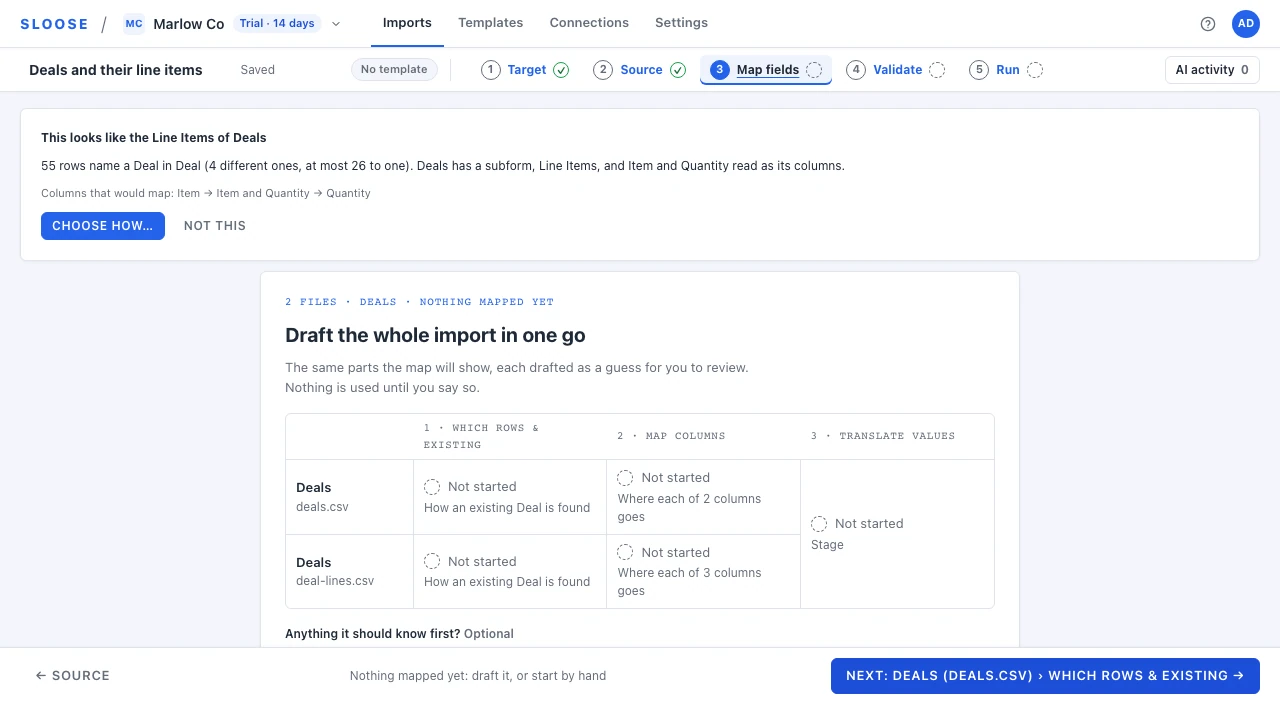
Once a file is the rows of a subform it writes the subform and nothing else. Its row on the map is the subform’s: Which rows is how its rows find their parent, and its columns are the subform’s fields. What you had mapped for the modules it wrote before is kept, and comes back when you Make this an ordinary file again.
How the rows are found and replaced
Section titled “How the rows are found and replaced”- Parents are looked up, never made by a subform file. A row’s parent is the existing record the link column’s value finds, equal to it ignoring letters’ case (except on an external id, which is matched in its own letter case) and the space around it, or a record another file of the same import makes first. Several rows naming one parent are one group.
- A parent is replaced whole, in one write. Its subform ends up holding exactly the rows of your file for it, in the file’s order. A parent a run writes to is all or nothing: if the CRM refuses one of its rows, none of that parent’s rows is changed.
- A parent is left alone, never half replaced, when the run takes only some of its rows (a row range, the row filter, or a stopped run), when its link finds several records, or when it was not found at all.
- Struck-out rows. A parent with a row you struck out on Source is left alone by default. Tick Remove struck-out rows from the CRM on the Which rows part to replace it with the rows that are kept, which deletes the struck-out ones from the CRM. At least one of the parent’s rows must be kept: a parent whose rows are all struck out is left alone, and its rows in the CRM stay.
Limits
Section titled “Limits”- Rows per parent. A subform holds at most the rows its layout says (
maximum rows, read from the CRM). A parent can be in one of several layouts, each with its own limit, and the CRM holds a parent to its own layout’s limit: the layout it is in, or the default layout for a parent Sloose creates. Before it writes, the run reads which layout each parent is in, and refuses a parent whole when its rows (once every value that names the same parent is put together) are more than that layout holds; the row says which layout’s limit it was. If a parent’s layout could not be read, the lowest limit of its layouts applies, and the row says so. Validate cannot know a parent’s layout, so it refuses a file only where a parent is above the highest limit of any layout, and warns where a parent is between the lowest and the highest: “may be over the row limit of the layout its Deal uses. The run checks each Deal’s own layout.” - Your plan’s rows per run. Each row of the sheet counts as one row against the plan. A parent’s rows are written together, so a parent with more rows than the run may write could never be written: Validate says so. Raise the limit, or keep fewer rows for that parent. Splitting a parent’s rows across runs does not help, since each run replaces the whole subform and only the last run’s rows would remain; splitting is safe only where each parent’s whole group stays in one run.
- One request. Sloose sends parents in groups, and fills each request up to what the CRM takes in one. A parent a request leaves unwritten for that reason is sent again, never dropped.
Required columns are Sloose’s rule
Section titled “Required columns are Sloose’s rule”A layout can mark a column of the subform as required. The CRM does not enforce that for rows written through the API, so Sloose does: Validate refuses a file that maps nothing into a required column, or leaves it blank in a row of a parent it will write, and the run leaves a parent alone whose formula leaves a required column blank (Not replaced, naming the column).
A column that only some of the layouts require is a warning at Validate, naming those layouts. The run then holds each parent to the columns of its own layout, and leaves a parent alone, saying which layout requires the column.
The layouts permission
Section titled “The layouts permission”Reading a subform’s limit and required columns needs a permission on the connection to read the CRM’s layouts. A connection made before it was asked for says so on its tile on Target (“Cannot read a subform’s limits and required columns until reconnected”), and Validate says the limit and required columns are not known, or may be out of date, and takes you to that tile. The tile offers Reconnect, which asks for the permission. A personal connection has no Reconnect: its tile says to choose another connection for imports with a subform. Nothing else about the connection changes, and an import with no subform never mentions it.
What the results say
Section titled “What the results say”A row of a subform file whose parent was written, or deliberately left alone, ends as one of three words, with the reason beside it (the full list). Any other row reads as any row’s does: Failed or No answer where its parent was refused or never answered, Written before on a resume, Would be written in a dry run, Not in this run outside the row range, Excluded where struck out.
- Replaced: the parent’s rows were replaced with the file’s, this row among them. The Deals record column (the parent’s label, then “record”) names the parent.
- Not replaced: the parent was left alone on purpose, with the reason: the run takes only some of its rows, its link found several records, its parent could not be made, a required column is blank, or it holds more rows than the subform allows. It is not a failure.
- No parent: the row’s link found no record to put it in.
A Retry takes only the parents a refusal or a lost answer failed. It does not take a parent that was left alone: change what left it alone (the row range, the filter, the data) and run the import again. Resume goes by parent too: a parent already replaced is not written again.
Before you run it
Section titled “Before you run it”- Check Validate: the limit and required-column findings are the ones the run will refuse by.
- Run a dry run. Each row says Would be written where its parent would be replaced, and Not replaced or No parent where it would be left alone, as a real run says them.
- Run it. Running the same file again replaces the same parents with the same rows.
Where it is in the API
Section titled “Where it is in the API”An agent or the SDK replaces parents’ rows through PUT …/records/{module}/rows (up to ten parents a call,
each parent all or nothing) and reads which layout each parent is in with GET …/records/{module}/parent-layouts, under an authorised run. Both are in the
API reference; the subform appears in the resolved configuration as a module marked as a child of its parent.