
People and roles
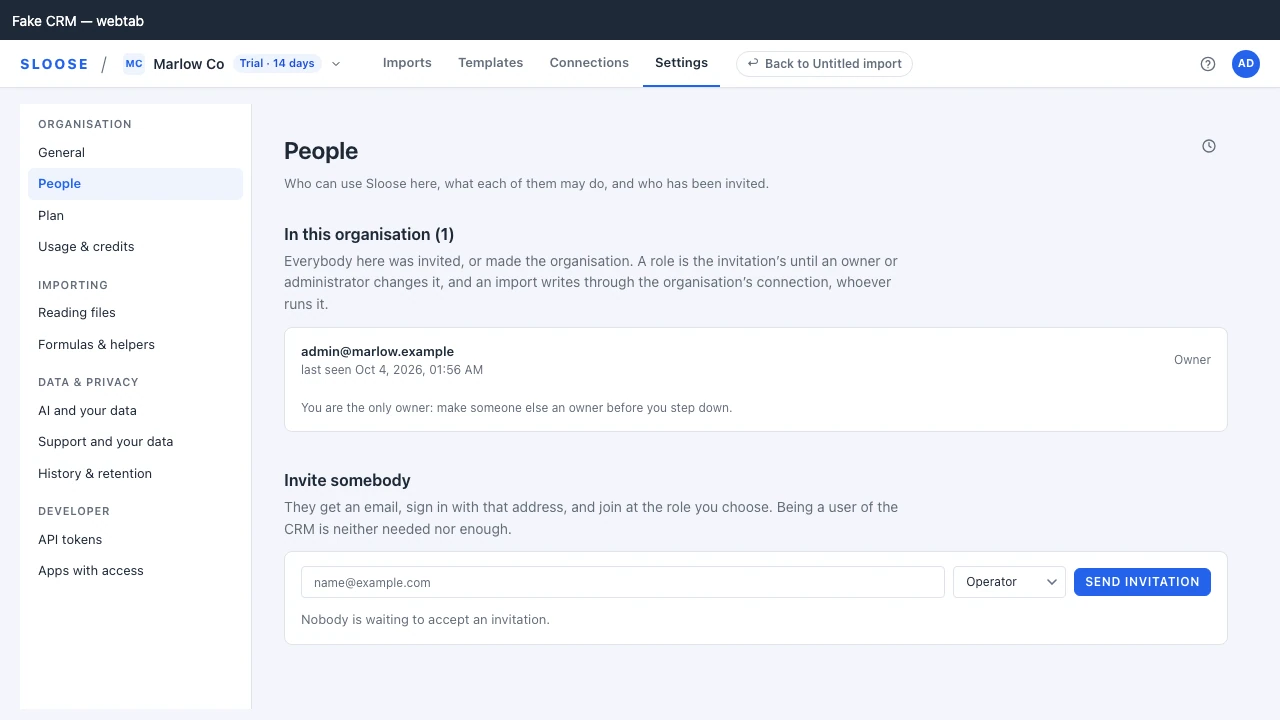
The People page of settings lists everybody in the organisation, their role and when they were last seen, and is where they are invited and removed.
Membership is by invitation
Section titled “Membership is by invitation”Somebody is in the organisation because they made it, or because an administrator invited them. Being a user of the CRM is neither needed nor enough: a consultant with no CRM login can be invited, and a CRM user nobody invited cannot get in.
An invitation goes to an email address. The person signs in with that address — a sign-in link, or the code that comes in the same email and is typed on the invitation’s page, or Zoho if the address is a Zoho login — and joins at the role the invitation named. The invitation is good for seven days and can be withdrawn from this page before it is used. Its link is in the invitation email and nowhere else, so if the email cannot be sent no invitation is made, and the page says so: try again later.
A user of your CRM can also ask to be invited, from the Sloose tab inside the CRM. They must have signed in with Zoho as one of the CRM’s users. The owner and each administrator get an email naming the person, their address and the CRM. Each request waits first on this page, under Asking to join, counted beside People in the settings rail, and the email’s link opens the page with that request marked. Approve sends them the usual invitation, at the role chosen beside it: an operator unless you choose another, and never above your own. Their CRM tab then offers to accept it. There is no Decline: nothing happens if nobody approves, and the request lapses after seven days, which each row says. Sloose keeps a record of who approved each request. If no administrator can be emailed, the request is not made and the tab says so. To stop your organisation being named to the CRM’s users at all, turn off Named to the CRM’s users on the connection’s Overview, under Connections.
What an import may do is gated by the role. It writes through the organisation’s connection — the grant an administrator made when they connected the CRM — and the records it creates are attributed to that administrator in Zoho, not to the person who ran the import. That is what lets an import run from anywhere, not only inside the CRM tab. Every role reaches every module of the organisation’s connections: an operator can read any of their records, and write any under a run it has authorised, in the app or through the API — a role limits what somebody may configure, not which records they may touch. What bounds it is that every write needs a run and is recorded, and nothing reaches the CRM but a connection’s own modules. Sloose never deletes a record itself — though an update is sent as written, and for a subform or a multi-select lookup the CRM can take it to remove entries.
The four roles
Section titled “The four roles”Ranked, so each includes everything below it.
| Role | Can |
|---|---|
operator |
Start imports, and change, run and delete the ones they started; read configuration; read any module’s records through the organisation’s connections, and write them under a run they have authorised. |
builder |
Everything above, plus change and run any import in the organisation (deleting only their own), and create and edit templates and schedules. |
admin |
Everything above, plus change, run and delete any import; curate modules, annotate fields, manage libraries and tokens, connect the organisation, manage members and billing. |
owner |
Everything above, plus start the trial, make another owner, and close the organisation. The person who creates an organisation starts as one. |
An import is its starter’s. An operator who opens somebody else’s import can read it and nothing more; a builder can change and run it but not delete it; an administrator or owner can do all three. A request past that is refused 403 NOT_YOURS.
The person who creates an organisation is its owner. An invitation can name any role but owner; an
owner is made by an owner, on this page.
Changing somebody’s role
Section titled “Changing somebody’s role”An administrator changes it on the People page. Nothing resets it afterwards: signing in says who somebody is and nothing about their role. Three rules stop an organisation escalating sideways or locking itself out:
- You can lower your own role, not raise it. Promoting yourself would defeat having roles at all. Stepping down is a real thing people do — handing over, or shedding admin rights they no longer want — so it is allowed.
- You cannot change somebody who outranks you, or grant a role above your own.
- The organisation cannot be left without an owner. Make somebody else an owner first.
The page offers only what those rules allow: no role above your own, only lower roles on your own
row (none at all for an organisation’s only owner), and an owner’s row to an owner alone — a row you may not
change shows its role in words, and says why. Somebody below an administrator sees everybody’s role
in words. Through the API, each refusal says which rule it hit: SELF_CHANGE, OUTRANKED,
LAST_OWNER.
Removing somebody
Section titled “Removing somebody”Removing a member takes them out of the organisation. Their next request is refused, and any session of theirs that was working in this organisation is left in no organisation — they are still signed in everywhere else they belong. Nothing they imported is touched.
It cannot be undone from here: the way back in is another invitation, which is why the page asks first. You cannot remove somebody who outranks you, nor the last owner, and you do not remove yourself here: you leave.
This is not the same as removing them from Zoho
Section titled “This is not the same as removing them from Zoho”Removing somebody here stops them using Sloose. It does not touch their CRM account, and it does not undo anything they imported.
If somebody is leaving the organisation, removing them in Zoho is the actual control; this is for the narrower case where they should keep their CRM but no longer be importing into it.
Leaving an organisation
Section titled “Leaving an organisation”Anybody can leave an organisation from Your organisations, on the Profile page of Your account (your avatar, then Your account), where every organisation you are in is listed with your role in it. Leave… asks first. Leaving is removal, done by yourself: you are out at once, any session of yours working in that organisation is left in no organisation, and what you imported stays with it. The organisation’s only owner cannot leave — it would have nobody to own it — so their row says what to do instead: make someone else an owner on People, or close the organisation.
Where the roles are enforced
Section titled “Where the roles are enforced”On the server, on every request — not once at sign-in.
Every organisation route re-reads the membership as it handles the request, so a demotion or a removal takes effect immediately rather than whenever the offending person’s session next ends. That is one indexed lookup per request against a control that would otherwise be worth very little.
The same applies to an API token: it acts as the member who created it, so removing that person stops the token too.