
Match records
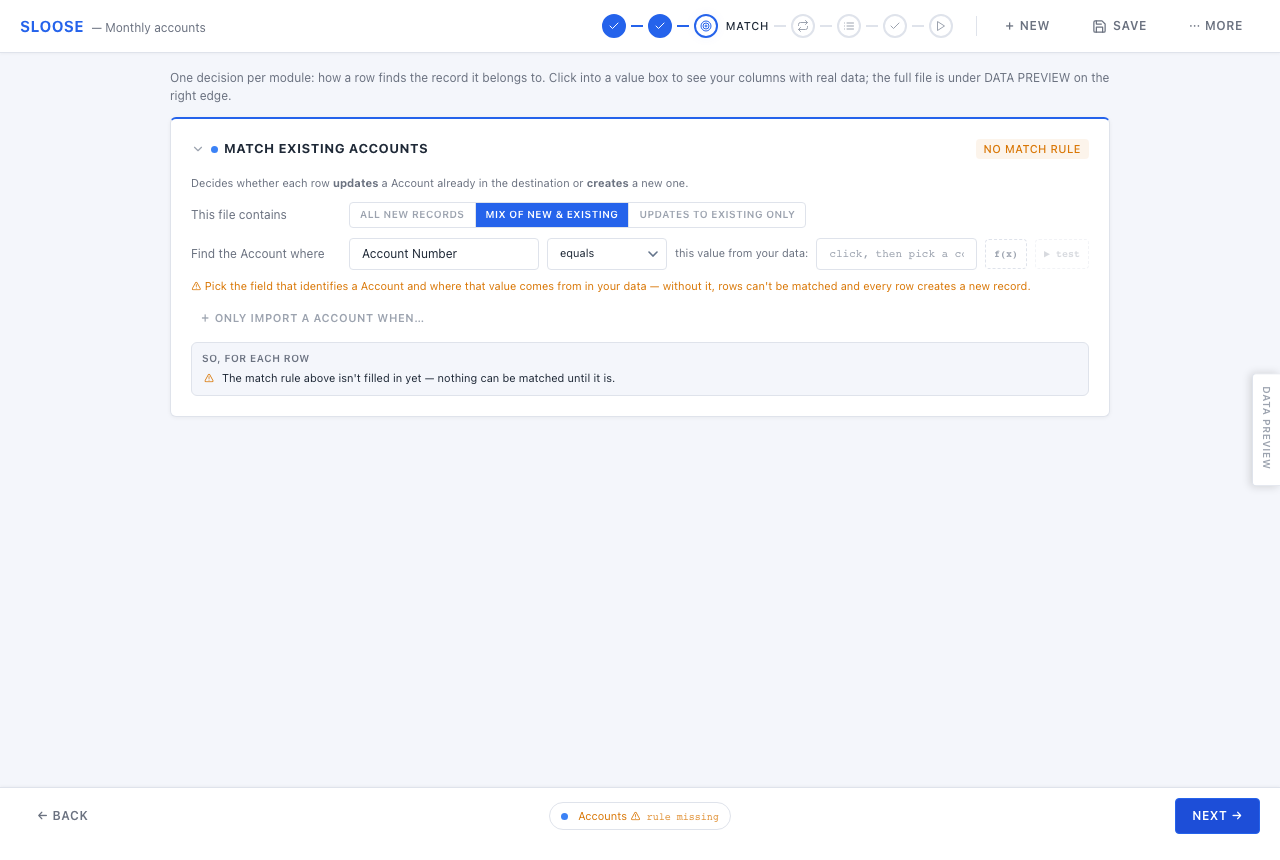
This step decides whether a row updates a record that already exists or creates a new one. It comes before mapping on purpose: what the run is for shapes every decision after it.
One decision per module.
What is in this file?
Section titled “What is in this file?”| Choice | What happens | Use it when |
|---|---|---|
| All new records | No matching. Every row creates. | A first load, or a file you know contains nothing that exists yet. |
| Mix of new & existing | Rows that match are handled your way; the rest create. | The usual case for a recurring file. |
| Updates to existing only | Rows that match are updated. Anything unmatched is left out. | Correcting or enriching records that already exist. |
All new records
Section titled “All new records”There is no rule to fill in, and a warning you should read rather than dismiss: import this file once. Running it again creates a second copy of everything. If the module has a unique field, the second run will also error on every row where the record already exists — which is unpleasant, but at least it is loud.
If you might run the file more than once, you want Mix of new & existing instead.
Updates to existing only
Section titled “Updates to existing only”Everything that does not match is silently left out — that is the point of the mode, but it means a bad match rule looks like “nothing happened” rather than an error. The dry run is how you find out before it matters.
The match rule
Section titled “The match rule”For the two matching modes you say how a row finds its record:
Find the Account where [field] [equals] [this value from your data]
Three parts:
- The field — a field on the destination module. Choose one that identifies exactly one record.
- The method — how it compares. Only methods your CRM’s search actually supports are offered; a method it does not support is rejected at validation rather than failing on every row.
- The value — usually a column, but any expression works. Use the
f(x)button for the formula editor.
Read the evidence line
Section titled “Read the evidence line”Underneath the rule, Sloose shows what your rule actually produces across the file: some real values, how many are distinct, how many are blank, how many error.
This is the most useful thing on the step. A rule with 400 distinct values across 400 rows is identifying records. A rule with 12 distinct values, or 200 blanks, is not — and you find that out here rather than at row 217 of the run.
Test it against the CRM
Section titled “Test it against the CRM”The test panel runs your rule against the real destination for a sample of rows and shows what comes back: found, not found, or several. It tells you the rule works before you commit to it.
When a match is found
Section titled “When a match is found”In Mix of new & existing, you choose:
- Skip the row — leave the existing record untouched.
- Update the record — write this row’s values onto it.
Either way, a row with no match creates a new record.
In Updates to existing only, matched rows always update, and unmatched rows are left out.
Update only when…
Section titled “Update only when…”When rows update, you can add a guard: an expression that must be true for the update to go ahead.
This is how you say “only overwrite when the incoming value is actually better” — don’t blank a
phone number because this file’s column is empty, don’t downgrade a status. The guard sees
old (the record as it stands) and next (what would be written), so comparisons between them
are the normal case:
next.Phone && next.Phone !== old.PhoneSeveral matches
Section titled “Several matches”A row whose rule matches more than one record is ambiguous, and Sloose will not guess. What happens is a run-wide setting on the Import step — ask, skip, or take the first — and the honest answer is usually that the rule needs to be narrower.
Only import when…
Section titled “Only import when…”Separately from matching, a module can carry a gate: an expression deciding whether this row should touch this module at all. A row with no email need not create a contact.
A gate can read records written earlier in the same row — so “only create the contact if the account was created” is expressible. It cannot read records written later; validation says so rather than letting it be quietly empty.
The mistake that costs the most
Section titled “The mistake that costs the most”Matching on something that is not unique. Company name looks fine on a sample of ten and falls apart on the real file, where two branches share a name and every row after that updates the wrong record.
Match on something that identifies one record — an account number, an email address, an external id. If no such field exists, the honest answer is often that this file is a create, not an update, and the deduplication belongs in the CRM afterwards.
The mistake that costs the second most
Section titled “The mistake that costs the second most”Matching on a value that nothing writes.
A record this run creates is built from your mappings alone — the match rule is how rows find
records, not how they fill them. So if you match Accounts on Account Number and no mapping fills
Account Number, every account this run creates is missing the one value the next run will look for.
Run the same file again and it matches nothing and creates the lot a second time. Nothing errors;
you simply have two of everything.
Sloose says so on this card as soon as both halves are in view:
⚠︎ You match on Account Number, but nothing writes it — Accounts created by this run will not carry “Account No”, so importing this file again would create them all over again.
It also warns when the field is written, but from a different column than the rule reads — the same broken loop, wearing a disguise. The run logs the warning too, and does not refuse: the value can legitimately arrive another way, such as a CRM that generates it. But if it does not, this is the warning to act on.
Two cases are deliberately quiet, because there is nothing to close: All new records (nothing is matched at all) and Updates to existing only (nothing is created).
Save order
Section titled “Save order”When a row feeds several modules, the order they are written in matters: a contact that points at an account needs the account to exist first. Sloose works the order out from the links you mapped, and the run-order card on this step shows what it decided. You can set it by hand if it has guessed wrong.