
Results and history
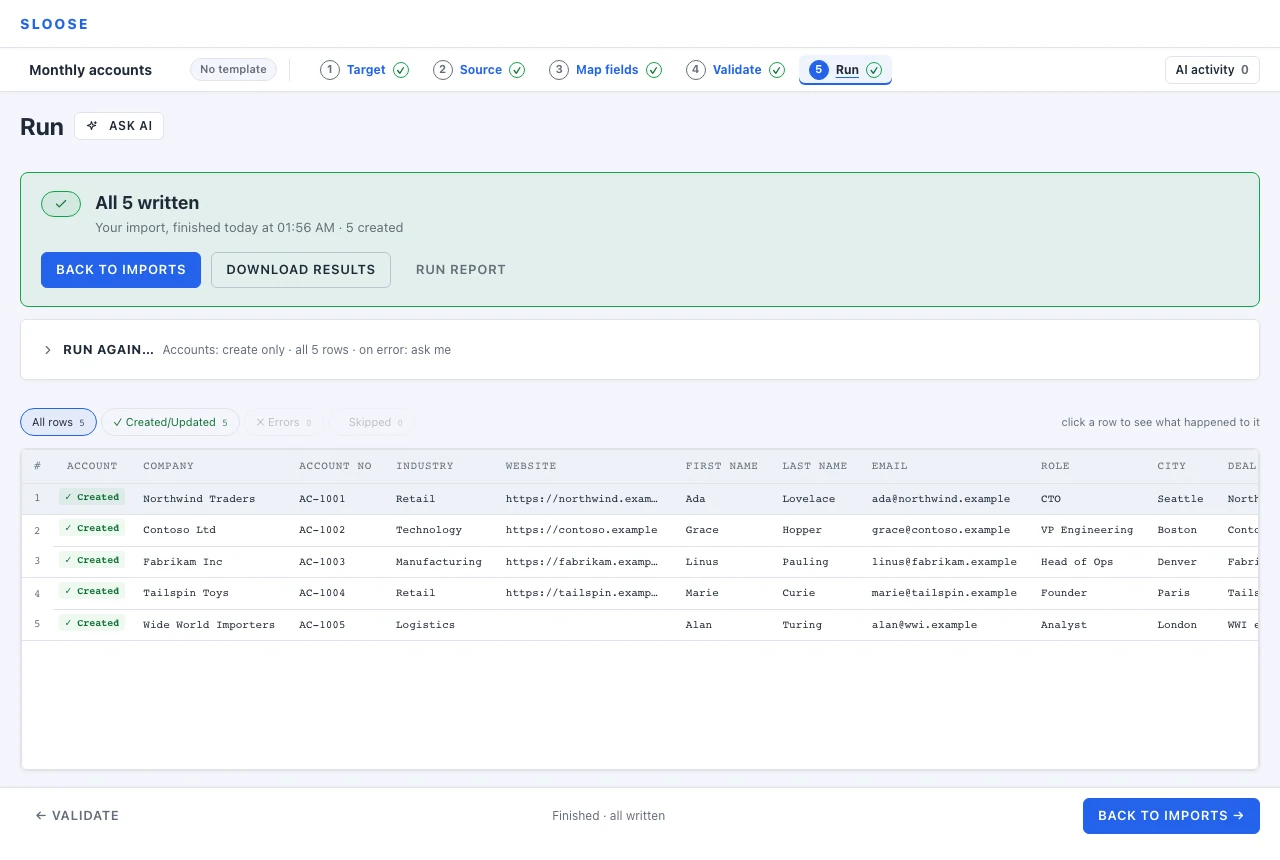
The result grid
Section titled “The result grid”One line per row, with what happened to it, one file at a time: with more than one file, the file tabs above the grid choose which. The tabs across the top narrow the view:
| All rows | Everything, in file order. |
| Created/Updated | The successes. |
| Errors | Rows that failed: the CRM refused a record or never answered, or a record they link to failed. |
| Skipped | Rows where nothing was written on purpose: a match rule or a lookup said to skip, or a Which rows rule held the row back. |
| Held back by rules | Rows a module’s Which rows rule or update guard held back. Shown only when there are any. |
| Dry-run OK | After a dry run, the rows that went through it without an error and that the CRM is not known to refuse. |
| Would be refused | After a dry run, rows that went through it but that Validate knows the CRM will reject. Shown only when there are any. |
Rows excluded on Source, or held back by its row filter, are never run, so they are not in the grid.
Skipped is not failed. A row skipped because your match rule said Skip it for a record it found, or because a Which rows rule held it back, did exactly what you asked. Only the Errors tab is a problem, and after a dry run Would be refused.
A large file is shown 500 rows at a time. Above the grid, Rows 501–1,000 of 20,000 says where you are, counted among the rows the tab keeps, with Previous and Next. Type a row’s number into Go to row to open it on its page, even if the tab in force hides it. Choosing another tab starts it on its first page. Show rows on a failure, See why, and the row a run opens when it ends all turn to the page that holds their row.
Click a row
Section titled “Click a row”Any row opens an inspector showing what was actually sent and what came back — the payload per module, the record it matched if it matched one, and why the CRM refused it if it failed.
The reason is the CRM’s; the words are not always. For Zoho’s three commonest refusals — a value another record already holds, a required field left empty, a value a field would not take — Sloose writes the sentence itself, from the code Zoho answered with and the field it named. For any other refusal — a validation rule, a workflow — the words are Zoho’s own message, with the field it named where it named one. Either way, this is where you see a rejection Sloose could not have known about.
The results file
Section titled “The results file”Download results on the panel a run ends on gives you the results of the file on screen as a CSV to open in a spreadsheet. It is the same file Settings → History & retention offers for that run, made on the server from the file exactly as the run read it, so the two can never say different things. The button waits a moment as a run ends, until Sloose has recorded how it ended. Where a write was sent and not yet answered it waits longer, a minute or two, while Sloose writes down the run’s last answers; either way the panel says so. A dry run’s file is made in your browser instead, since a dry run writes nothing for the server to pair the rows with.
The file has every row the file read, in order, with its own columns, then Result (what the run did with the row, one of the words below), a record column per module with the ID of the record it wrote or found, and Error. The Error column says what went wrong, and anything else worth knowing about the row — a record that may exist twice, or a lookup that did not come to one record. Where a row has more than one record column, each failure begins with the record type it is about, and a field that could not be filled in after the record was saved is named: Accounts, Description: too long. A note the CRM refused or never answered is named the same way, as Note: Deals, Note: …, and fails its row, the record itself written: Failed for a note Zoho refused, and No answer for one it never answered (unless another failure of the row takes precedence), so look for both when you filter.
The file is UTF-8 and begins with a byte-order mark, so that Excel reads its accented letters as
they are. A program reading it — the download, or
GET /orgs/{org}/imports/{id}/results.csv?run={run} —
should drop the mark before the first header cell, or that header reads as a different name.
The route gives no file of a run that has not ended (409 RUN_NOT_ENDED): a row’s failure, its
skip and Not reached are recorded as the run closes. Nor for two minutes after the page that ran
it closes it (409 RUN_SETTLING), while that page may still report how its last rows ended; the
page that ran the run gets its file at once, since it has nothing more to report.
Loaded back into Sloose as a file, it is read as before: the mark is dropped.
A run’s results can still be arriving after it ends. Through the API a run’s settled
(GET /orgs/{org}/imports/{id}/runs/{run}) is false while the run goes, and then:
- for two minutes after the page that ran it closes it (finished, cancelled, or stopped on an error), because that page may report how its last rows ended just after. A run the server ended — one that hit the plan’s row limit, or was abandoned — has no such report to wait for;
- for any run, while Sloose writes down which writes the CRM never answered: at once for a write the page reported, and up to about three minutes after the run’s end where a page went away with a write still out. Until then a row’s result may still change to No answer.
Read it again before taking a results file or its counts as whole. The page does this by itself, which is why Resume and Retry wait at first (Resuming).
What Result can say:
| Result | Means |
|---|---|
| Written | The run wrote the row’s records. |
| Failed | A record of the row was refused or could not be written; Error says why. |
| Skipped | Nothing was written, on purpose: a match rule or a lookup said to skip. |
| Would be written | A dry run: what the real run would write. |
| Unchanged | Only where the import is set to leave a record alone when writing would change nothing: the row matched a record that already held every value the row would write, so nothing was sent for it. Not a failure and not a skip, and a retry does not take it. |
| Would leave unchanged | A dry run: the real run would leave this row’s matched record alone, because it already holds what the row would write. |
| Excluded | The row was excluded on Source, so no run reads it. |
| Filtered out | Source’s row filter held the row back. Said in a dry run’s file only: for a run that wrote, the server cannot tell which rows the filter held back, and leaves their Result empty. |
| No answer | A write was sent and never answered, so the record may or may not exist. |
| Written before | A retry’s row that an earlier run of the same chain had already written. |
| Written, may be unfinished | One of the last rows a run wrote before it stopped short. Sloose writes rows in groups, one record type at a time, so a run cut off part-way through a group can leave a row with its first record and not the next. Resume goes over these rows again and makes nothing twice. Where the run that stopped was itself a retry, Retry from its screen goes over them too. Where that later run finds nothing missing and completes without writing or recording anything, the rows it went over are finished: this run’s file then says Written of them, and the later run’s file says Written before. A row it did not go over, because the row was excluded or filtered out on Source by then, keeps its warning. Finished means the import as it now stands has nothing more to write for the row: where the mapping was changed after the run stopped, the later run goes by the mapping as it is now. Where the later run had records to write and wrote them, this run’s file keeps its warning, and the later run’s file says Written. |
| Not reached | The run stopped before this row: it reached the row limit applied to the run, or it was cut short (somebody stopped it, it stopped itself at a failed record because the import says to, its page was closed, or the CRM’s API credits ran out). Nothing is wrong with the row, so its Error is empty. The one exception is a row the run stopped part-way through when the credits ran out: its Error then says the rest of the row was not written, beside the record it had already made, and names the way to finish it: resume the import, or retry the failed rows where the import’s first run had finished and there is nothing to resume (there, a row stopped before anything of it was written says so too, and to retry it). |
| Not recorded | The run finished, and has no record of this row: its page left while the row’s result was still on its way. |
| Not in this run | The row is outside the range the run was set to walk. |
| Replaced | A row of a subform tab whose parent’s rows were replaced with the file’s rows for it, this row among them. |
| Not replaced | A row of a subform tab whose parent was left alone on purpose, with the reason beside it: the run takes only some of its rows, its link found several records, its parent could not be made, a column the layout requires is blank in one of its rows (it names the column), or it holds more rows than the subform allows, counted once every value that names the same parent is put together. Not a failure, and a retry does not take it. |
| No parent | A row of a subform tab whose link found no record to put it in. |
The run report
Section titled “The run report”Run report on the same panel opens it. The report gives you three things:
- A summary digest you can copy into a ticket or an email: counts by row and by module (five Accounts created, five Contacts updated), and what the rules did.
- The chronological log, every step in order.
- The raw results, as JSON, downloadable: each row the run has a result for, under
rows, with its payloads and its outcome. A row the run never started is not in it (the file says so inabout); the results file lists every row.
Download the raw results when you need to reconcile against something else, or keep a record outside Sloose of exactly what a run did.
Failures, and what to do with them
Section titled “Failures, and what to do with them”Some rows failing while others succeed is a normal outcome, not a broken run.
The shape that works:
- Filter to Errors and read a few. They usually have one or two causes, not twenty.
- Fix the cause — a value in the grid, a mapping, a value map.
- Retry n failed rows says which rows will run again and what you changed since, then re-runs only those rows once you press Retry beside it.
Rows that succeeded are not touched by a retry.
A row whose record was written and whose note was refused is a failed row: a retry adds that note alone, and does not write the record again. A row of a subform file that was left alone on purpose (Not replaced) is not a failure, and a retry does not take it.
If the failures are all the same message, the fix is one mapping. If they are all different, the file is probably the problem rather than the mapping.
Run history
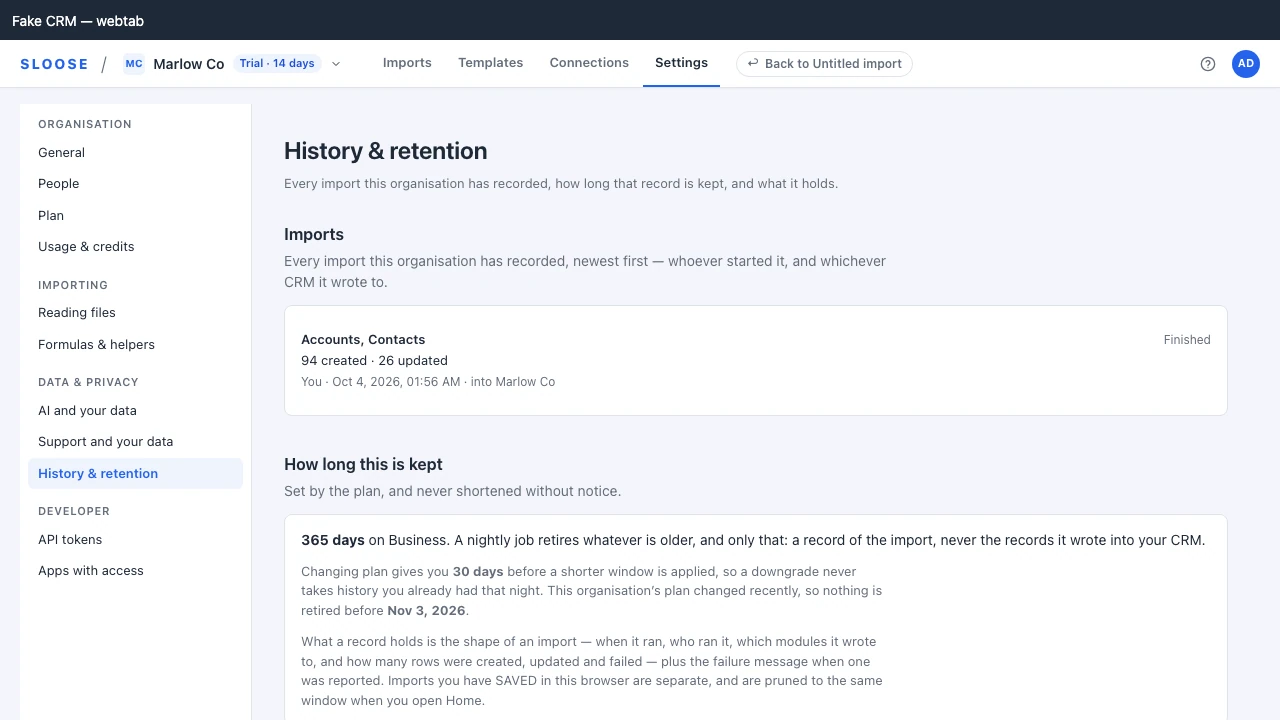
Section titled “Run history”Every import is recorded against your organisation: who started it, when, how many rows were created, updated and failed, which modules it touched, and which CRM it wrote to. It is under Settings → History & retention, and every member can read it. Each connection’s Imports and runs page lists the runs made through it.
For a run of an import that has ended, its line offers Download rows with results (for the first two minutes after a run ends it answers that the file will be ready shortly): the results file, made on the server from the file exactly as that run read it, so last month’s run can still be read row by row after the page that ran it is gone. A run that read several files asks which one. The server cannot tell which rows the row filter held back, so it leaves their Result empty. A retry’s file says of the rows the retry did not walk what the run before it left them as: still failed, not reached, or written before. A very large file can be more than the server will make a results file for — it sets 64 MB aside for one, counted for each file of the run on its own, which a file of half a million rows feeding six modules can pass — and then the line says so and gives no file. Download results, on the panel the run ended on, asks for the same file and says the same. There is no results file for a run that large. Its rows and what happened to each are on the Run step’s table, and the run report can download every row the run has a result for, as JSON.
A dry run is recorded too, marked Dry run. It holds the import while it goes, like any run, and writes nothing and counts against nothing. It is not offline — the searches for existing records are most of what a dry run is for, and those searches go through Sloose like any other. Its row is the record that somebody checked before they imported; the history has no results file for it, because it wrote nothing to pair the rows with. (While the dry run is on screen, the panel’s Download results still gives you its file.)
An import that is still going reads as Unfinished. So, for a while, does one whose window was closed half way: once nothing keeps its hold on the import, Sloose ends the run, and it reads Abandoned.
Retention depends on your plan:
| Plan | History kept |
|---|---|
| Free | 7 days |
| Team | 90 days |
| Business | 365 days |
| Enterprise | 365 days |
History is retired automatically once it is older than that, so an established organisation with an empty list is expected rather than a fault. Changing plan gives you 30 days before a shorter window is applied: a downgrade never takes history you already had, that night.
What the history does and does not hold
Section titled “What the history does and does not hold”It holds what happened: counts, outcomes, modules, timings, the error message where a run failed. With the run, Sloose also keeps what it did record by record — each record’s outcome, its ID in your CRM, the CRM’s reason when it refused one, and the values it was matched and linked by — for as long as the run stays in the history, and deletes it with the run, or with the import.
It does not hold the rows you imported. The file is kept with the import, not the history, until the import expires or is deleted — Download rows with results reads it from there, so it works only while both the run and its import are kept. The records Sloose reads back from your CRM to match and link rows are not kept at all. If you need the rows with their results for longer, download them and keep the file.
Saving what worked
Section titled “Saving what worked”If this import is something you will do again, keep it as a template: after a run, the panel asks Keep this setup for next time? and offers Save as a template — or, for an import started from a template, to update that template with your changes or save a new one. The mappings, match rules and value maps come back next time, and you only bring a new file.
That is the difference between an import taking twenty minutes the first time and two minutes every time after. See Save and reuse a template.
Keep what worked?
Section titled “Keep what worked?”After a run in which nothing failed, After this lists what the import taught, in two places:
- Remember on the fields. Each column this import read that its field does not answer to yet, as Account Number also answers to “ACCT #”. Remembered, it becomes one of the field’s aliases, and every import into the connection finds it by name, whatever the file or template. Every name starts ticked; untick one you mapped for this file only, then press Remember 3 names. Only somebody who may change the connection’s fields can press it — an administrator — and everybody else is told an administrator can. While Sloose is still checking who may, the button waits; if it could not check, the card says so and offers Try again.
- Saved with this import, not on the fields. A field can remember the name of a column it was filled from, but not a formula or a field left empty. A field can hold one as its default mapping, and then it is the field’s and isn’t listed; anything else this import did, a template can keep: Update the template with these changes, or Save as a new template (Save as a template on an import that did not start from one).
Some names are listed as not offered, each with its reason:
- another field’s own name, or a name another field already answers to — remembering it would take that column away from the other field in every later file;
- a column this import read into two fields;
- a heading with no letters or digits, such as # — the name matcher matches no name with no words, so remembering one would do nothing;
- a heading told apart only by a symbol the matcher doesn’t read, such as Amount € — remembered, it would answer to Amount $ and Amount too.
A column that is the field’s own name, in any spelling of its letters and accents, needs nothing remembering and isn’t listed.
A formula a field fills by default is the field’s, so it is not listed. Leave it puts the card away.
If a configuration repository pushes a module’s fields, the card names those modules among the ones
it offers names on, and says when a push last wrote them. A push replaces those modules’ field
settings — aliases included — with what the repository holds, so add the names there too, or the
next push takes them away. A push leaves alone the aliases of a module the repository holds no
fields file for (its modules.json entry still sets that module’s curation and excluded fields),
and the card says nothing about it. See Configuration as code.
For an import started from a template, a line marked On its own says what a run without anybody at the screen would make of a file shaped like this one. Such a run accepts a column by the name the template reads, or by a name its field answers to, and nothing else: not a spelling it has not been told, not a guess from the values, and never the AI. Remembering the names above is usually what lets it run.