
Discovery
Sloose has no built-in idea of what a Zoho organisation contains. Discovery is how it finds out: it reads every module and every field and keeps a snapshot. What it finds belongs to the connection it read, so an organisation holding two CRMs has two sets of modules and fields.
Until it has run, there is nothing to curate and nothing to map.
It happens when the CRM is connected
Section titled “It happens when the CRM is connected”Connecting the CRM is what discovers it. An administrator connects a CRM from Home, which offers it until the organisation has one and opens Zoho CRM’s own set-up page, or with + Add a connection under Connections in the app bar, which asks what is being connected first and then opens the same page. Either way Zoho asks them to allow Sloose, and the token Zoho issues is used on the way through to read every module and field — so the connection arrives discovered the moment it is made, and opens on choosing its modules. Reconnecting reads it again the same way. Signing in, by contrast, says who you are and reads nothing.
A failure at that point is not fatal: the connection’s Overview offers to read the CRM again, through the grant just stored.
Connecting, and what it is actually for
Section titled “Connecting, and what it is actually for”Connecting is the offline grant: the server keeps a refresh token, encrypted at rest, and can read and write your CRM whether or not anybody is signed in. It is what every import writes through — records are created as the administrator who connected the CRM, with their permissions — and what unattended re-discovery and the scheduled runs that are coming will use.
Only an administrator can connect. The refresh token never leaves our server.
Zoho keeps 20 grants for each Zoho login. Every connection made with one Zoho login holds one of them, in whichever organisation it is (Sloose counts the ones in one data centre: the connection’s own, or for a new connection the one where you hold most), and when a 21st is made Zoho quietly ends the oldest: that connection’s grant stops working, and its imports and reads stop until it is reconnected. Someone who connects many client CRMs with one login can reach that, so before connecting or reconnecting, Sloose counts the grants you hold. When the new one would end another, it says which connection would end and in which organisation, then asks you to choose Connect anyway or Cancel. If the grant that would end was made in the same instant as the grant just older or just newer than it, Sloose cannot tell which of them Zoho counts as the oldest, so it asks nothing rather than name the wrong one. A connection whose grant Zoho ended this way says so on its Overview. Reconnecting it with the same login ends that login’s oldest other connection in turn, so for more than 20 CRMs, connect some of them with another Zoho login.
Running it again
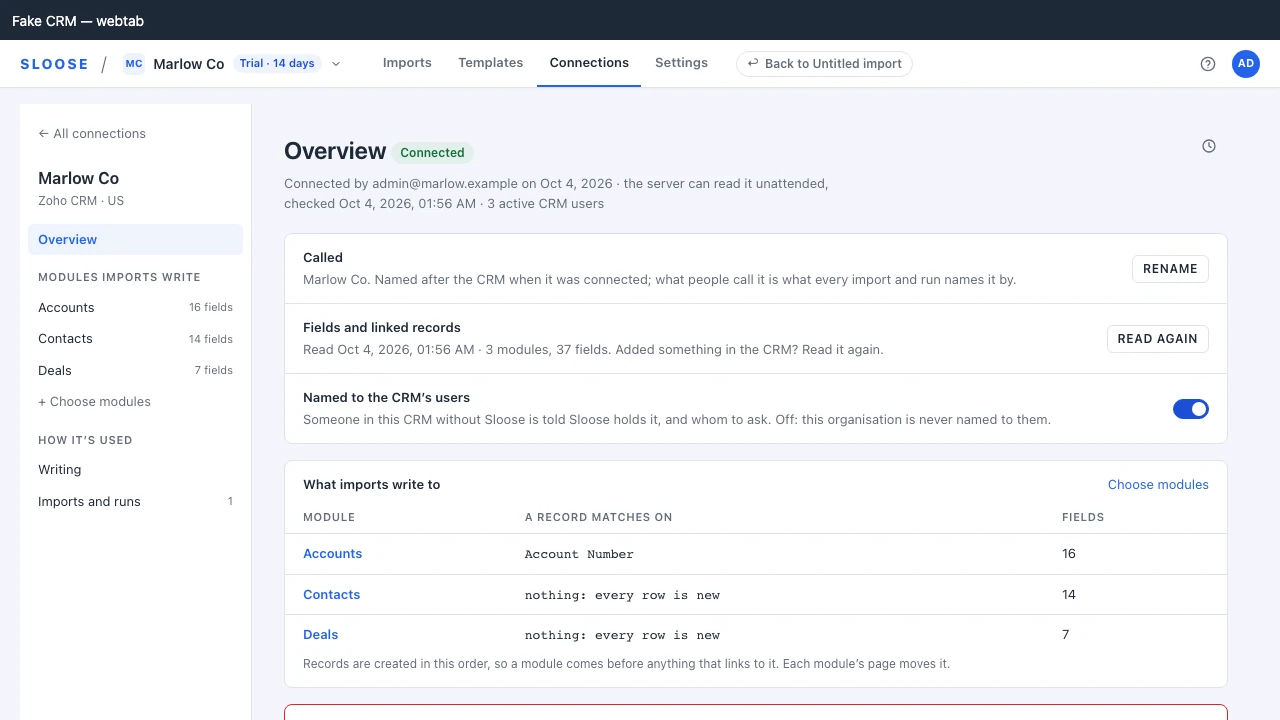
Section titled “Running it again”Each connection’s Overview, under Connections in the app bar, shows its last run under Fields and linked records — when, how many modules and fields, and how many could not be read — and offers an administrator Read again. An organisation holding several connections reads each on its own Overview: they are different CRMs, and one’s read says nothing about another’s.
It needs a working connection, because a read on demand happens with nobody present. While a connection is disconnected, or Zoho no longer accepts its grant, Read again is disabled and says why: reconnecting it reads the CRM straight away. Signing in does not read a CRM’s modules or fields — a Zoho sign-in reads only who you are, and, in a CRM tab that needs it shown, which organisation your CRM is: a connection is read when it is made or reconnected, and when an administrator asks.
Between whole reads: one module at a time
Section titled “Between whole reads: one module at a time”A picklist’s options are part of the field, so an option added in Zoho after the last read is unknown to Sloose until its module is read again. Two things read less than a whole connection, each one call to the CRM for a module:
- Opening an import reads the fields of the modules that import writes to again, in the background, when their last read is over a day old. The page you opened is not held up by it, and a module that has not changed is written to no differently than before: the configuration’s version moves only when something actually changed, and an open page takes the new configuration as it takes any other.
- Validate’s Read … again — named for the field, Read Lead Source again — beside an unmapped picklist value, reads that one module now and judges again, so an option added a minute ago is one press away. A module read less than half a minute ago is not asked of the CRM a second time.
Each module remembers when its fields were last read. For one that has never been read on its own, the connection’s latest read stands in for it.
What a whole read covers
Section titled “What a whole read covers”It walks every module the CRM lists and reads the fields of each one an import could write to. Zoho’s list holds far more than the modules your organisation works in, so these are skipped:
- Modules the Zoho API does not support.
- Things that are not a module of their own: web tabs, the linking module behind a multi-select lookup, field history.
- Zoho’s own hidden modules, such as attachments and notes (a column of your file reaches a record’s notes through Note content, not through a module), and ones it never shows as a tab. A module an administrator hid from the tabs is still read.
- Modules that take no record at all, such as the store behind each file-upload field.
A subform is kept as the child of its parent. The line items of a deal are a module of their own in Zoho’s list, read like any other, but they are not a module an import starts with: they are offered nowhere on Target, and a file is made their rows on Map fields (Rows inside a record). Discovery also reads the parent’s layouts for the subform’s row limit and its required columns, which needs the connection’s permission to read layouts (a connection made before it was asked for is told to reconnect, on its tile on Target).
A CRM with a file or image upload field is asked once whether the connection may upload files. Discovery sends Zoho one empty upload, which makes nothing and which Zoho refuses either way: it refuses it differently when the connection lacks the permission to upload files. That costs about one Zoho API credit, once for each connection (the answer is kept until the connection is reconnected), and is not sent while Zoho is turning calls away. A CRM with no such field is never asked.
If a single module’s fields cannot be read, that module is recorded as an error and discovery continues. One inaccessible module does not cost you the other forty. The exception is Zoho turning calls away, for a moment or because the CRM’s day of API calls is spent: discovery then stops asking, the error names the module it stopped at, and that module and the ones after it are kept as they were until they are read again.
Reading the diff
Section titled “Reading the diff”After a re-run the Overview says what changed against the previous snapshot, in counts: modules
added or gone, and fields added, gone or changed in type (Since the read before: 2 fields added, 1
field changed.). A first read has nothing to compare against and says nothing.
GET /orgs/{org}/discovery/latest?connector=… names each one.
This is worth actually reading. A field that changed type is the kind of thing that turns a working monthly import into a run full of validation errors — and the diff is where you see it before that happens rather than after. A picklist that gained or lost an option is taken up by the read but not counted in it; Validate is where that shows, beside the values it affects.
Removed fields are flagged, not deleted
Section titled “Removed fields are flagged, not deleted”When the CRM stops returning a field, Sloose marks it as removed and keeps it.
That is deliberate. A template saved six months ago may map that field, and a template referring to something that has silently vanished cannot explain itself. Flagged, it can: the field is still there, marked as gone, and the mapping tells you why nothing is being written.
Removed fields are hidden from mapping, and from a module’s page until you tick Show fields the
CRM no longer returns; ?all=true on GET /orgs/{org}/config/fields/{module} (with ?connector=
naming the connection) includes them.
What survives a re-run
Section titled “What survives a re-run”Everything you have curated:
- Which modules are chosen, their order, their keys and singular names.
- Match defaults and unique fields.
- Field annotations.
- Hidden fields.
Discovery updates what the CRM says. It does not touch what you have said about it. The two are kept separately for exactly this reason.
What a module is called is yours too. A module renamed under Called on its page, or by a
configuration repository’s label, keeps that name through Read again and a reconnect. A module
nobody has renamed follows the CRM: when the CRM renames it, the next read does too.
How often
Section titled “How often”There is no schedule for a whole read; you run it when the CRM changes. (Opening an import reads the fields of its own modules when their last read is over a day old — see above.)
In practice that means: after adding a custom field you intend to import into, after a layout change, and before the first run of a monthly import if somebody has been editing the CRM in the meantime. It is cheap and it is safe to run again.
Active CRM user count is recorded at the same time, which is what plan bands are measured against — see Plans and limits.
When a field you expect is missing
Section titled “When a field you expect is missing”In order of likelihood:
- Discovery has not run since the field was added. Read again on the connection’s Overview.
- The field is hidden on this module, or on every module of the connection. See Excluding fields.
- The field is one the CRM will not let Sloose write — read-only, filled by the CRM itself, or on the CRM’s own list of fields nobody can map. Map fields never offers those.
- The module’s fields failed to read during the last run. The Overview says how many modules
could not be read, and
GET /orgs/{org}/discovery/latest?connector=…names them inerrors.